code block
devtools::install_github("wilkelab/ungeviz")Lesson 4c: Visualising Uncertainty
Victoria Neo
February 6, 2024
February 7, 2024

| Work done | Hands-on Exercise 4c |
| Hours taken | ⏱️⏱️ ( hospitalisation leave) | |
| Questions | 0 |
| How do I feel? | 🤔 |
| What do I think? | Hands-on Exercise 4c was really so interesting! I did not have any prior notion of visualising uncertainty and this was one limitation of Take-home Exercise 01 and 02. How can we move away from simplified summaries or integrate both? |
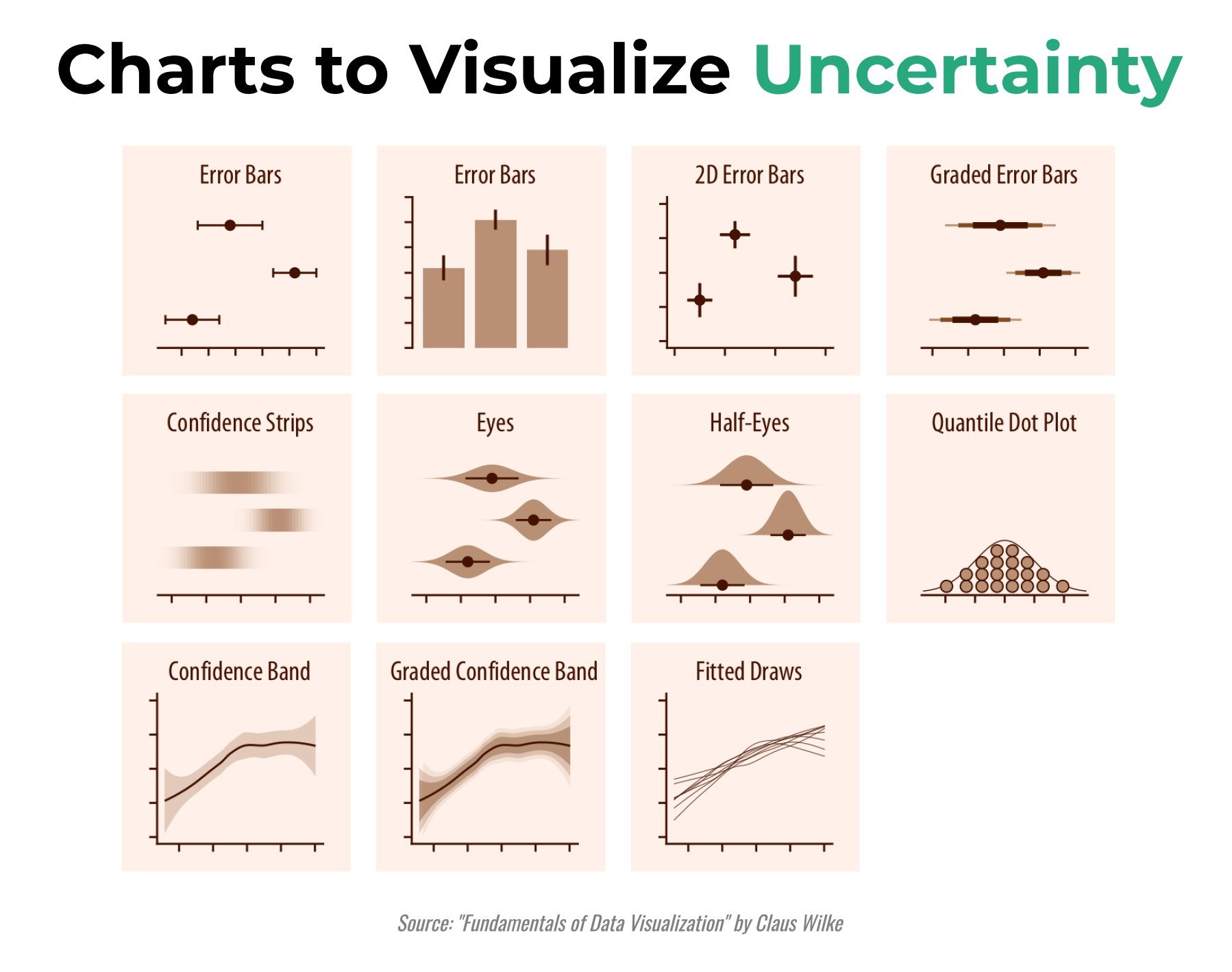
Visualising uncertainty is relatively new in statistical graphics. In this chapter, you will gain hands-on experience on creating statistical graphics for visualising uncertainty. By the end of this chapter you will be able:
to plot statistics error bars by using ggplot2,
to plot interactive error bars by combining ggplot2, plotly and DT,
to create advanced by using ggdist, and
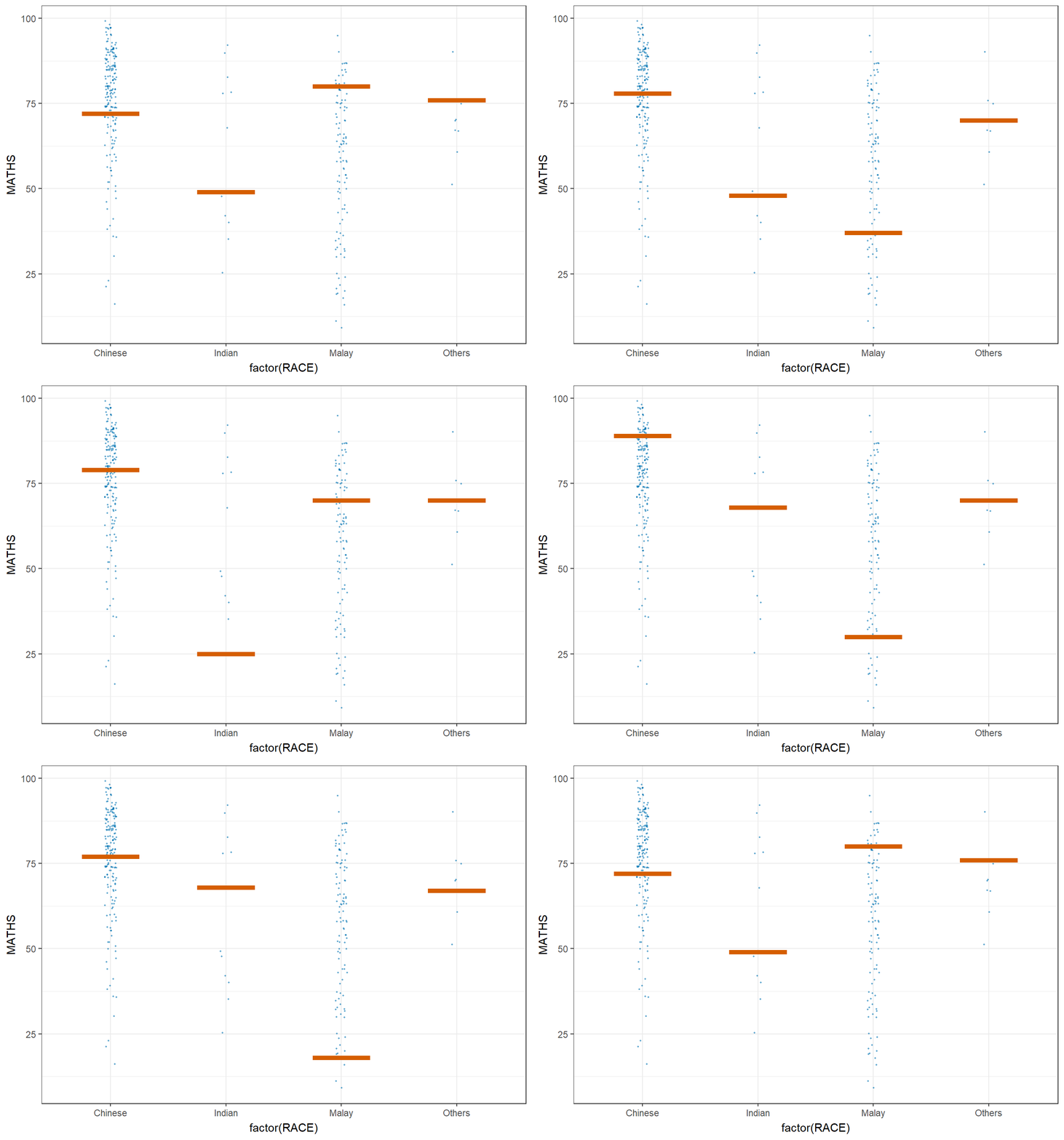
to create hypothetical outcome plots (HOPs) by using ungeviz package.
According to Visualizing uncertainty,
Another definition by Nathan Yau in Visualizing the Uncertainty in Data states that:
The code chunk below uses p_load() of pacman package to check if the following R packages are installed in the computer. If they are, then they will be launched into R.
tidyverse, a family of R packages for data science process,
plotly for creating interactive plot,
gganimate for creating animation plot,
DT for displaying interactive html table,
crosstalk for for implementing cross-widget interactions (currently, linked brushing and filtering), and
ggdist for visualising distribution and uncertainty.
This section is taken from Hands-on_Ex02 as we are using the same data set.
The data set, Exam_data.csv, contains the Year-end examination grades of a cohort of primary 3 students from a local school, and is uploaded as exam_data.
In the code chunk below, read_csv() of readr package is used to import Exam_data.csv data file into R and save it as an tibble data frame called exam_data.
A point estimate is a single number, such as a mean. Uncertainty, on the other hand, is expressed as standard error, confidence interval, or credible interval.
Don’t confuse the uncertainty of a point estimate with the variation in the sample.
According to Visualizing uncertainty,
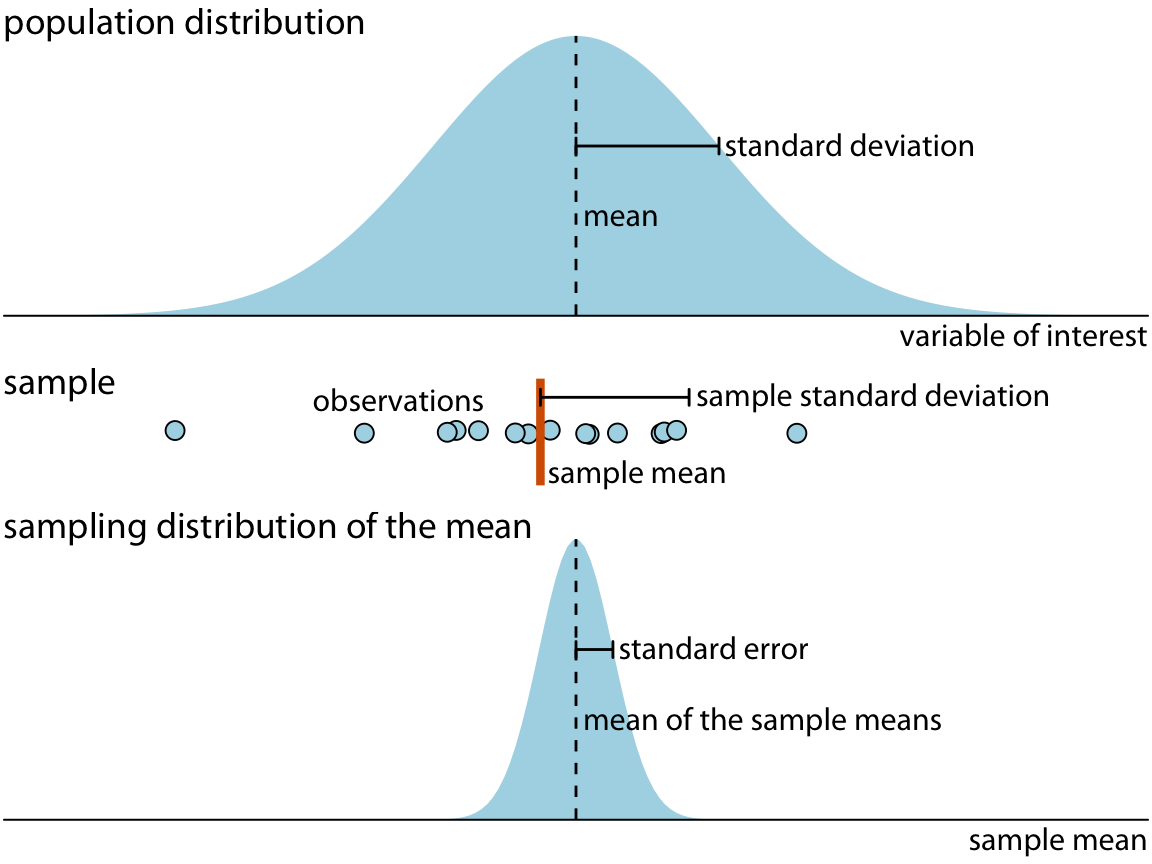
In this section, you will learn how to plot error bars of maths scores by race by using data provided in exam tibble data frame.
Firstly, the code chunk below will be used to derive the necessary summary statistics.
group_by() of dplyr package is used to group the observation by RACE,
summarise() is used to compute the count of observations, mean, standard deviation
mutate() is used to derive standard error of Maths by RACE, and
the output is save as a tibble data table called my_sum.
Things to learn from the code chunk above:
group_by() of dplyr package is used to group the observation by RACE,
summarise() is used to compute the count of observations, mean, standard deviation
mutate() is used to derive standard error of Maths by RACE, and
the output is save as a tibble data table called my_sum.
Next, the code chunk below will be used to display my_sum tibble data frame in an html table format.
| RACE | n | mean | sd | se |
|---|---|---|---|---|
| Chinese | 193 | 76.50777 | 15.69040 | 1.132357 |
| Indian | 12 | 60.66667 | 23.35237 | 7.041005 |
| Malay | 108 | 57.44444 | 21.13478 | 2.043177 |
| Others | 9 | 69.66667 | 10.72381 | 3.791438 |
Now we are ready to plot the standard error bars of mean maths score by race as shown below.
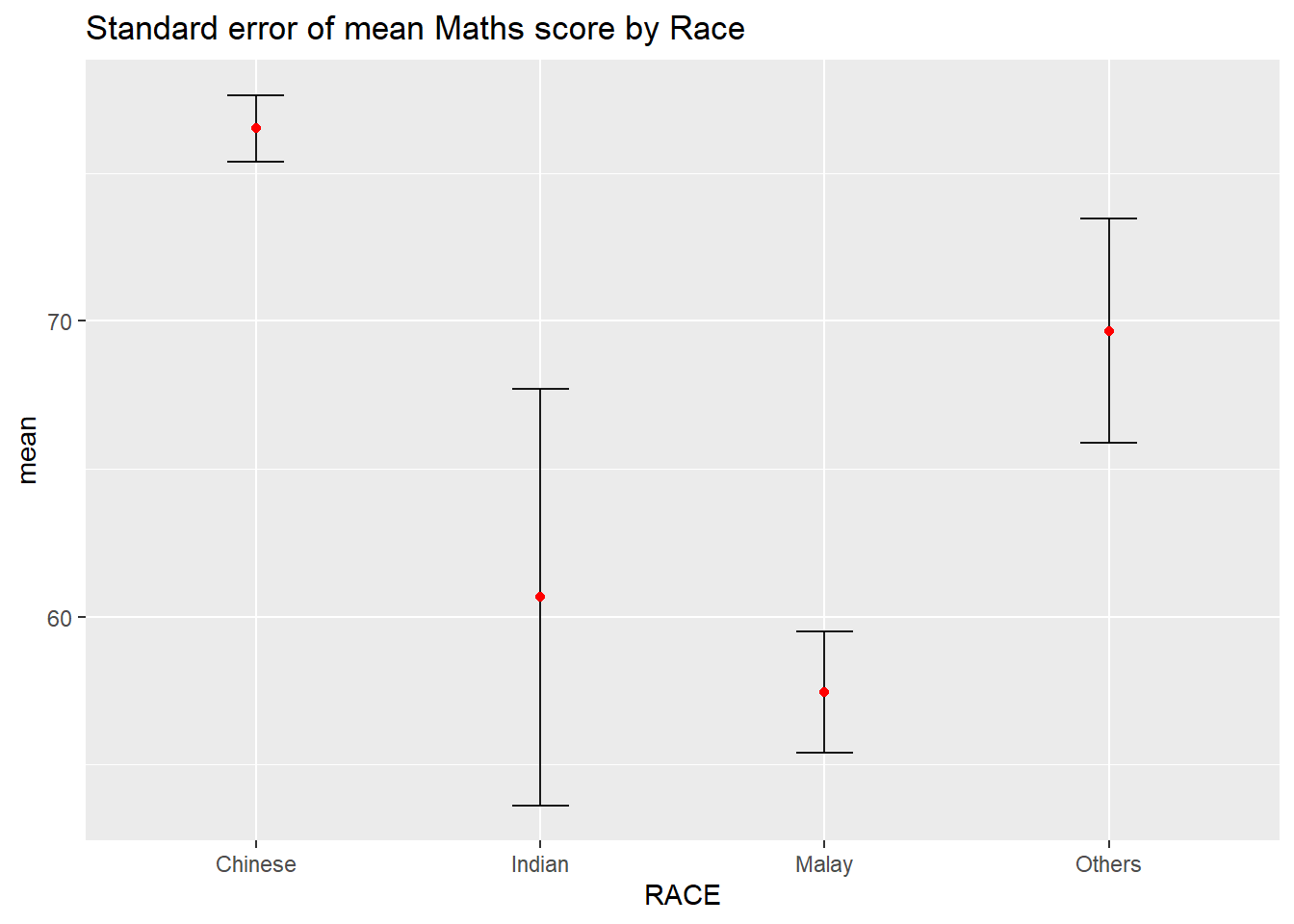
Things to learn from the code chunk above:
The error bars are computed by using the formula mean+/-se.
For geom_point(), it is important to indicate stat=“identity”.
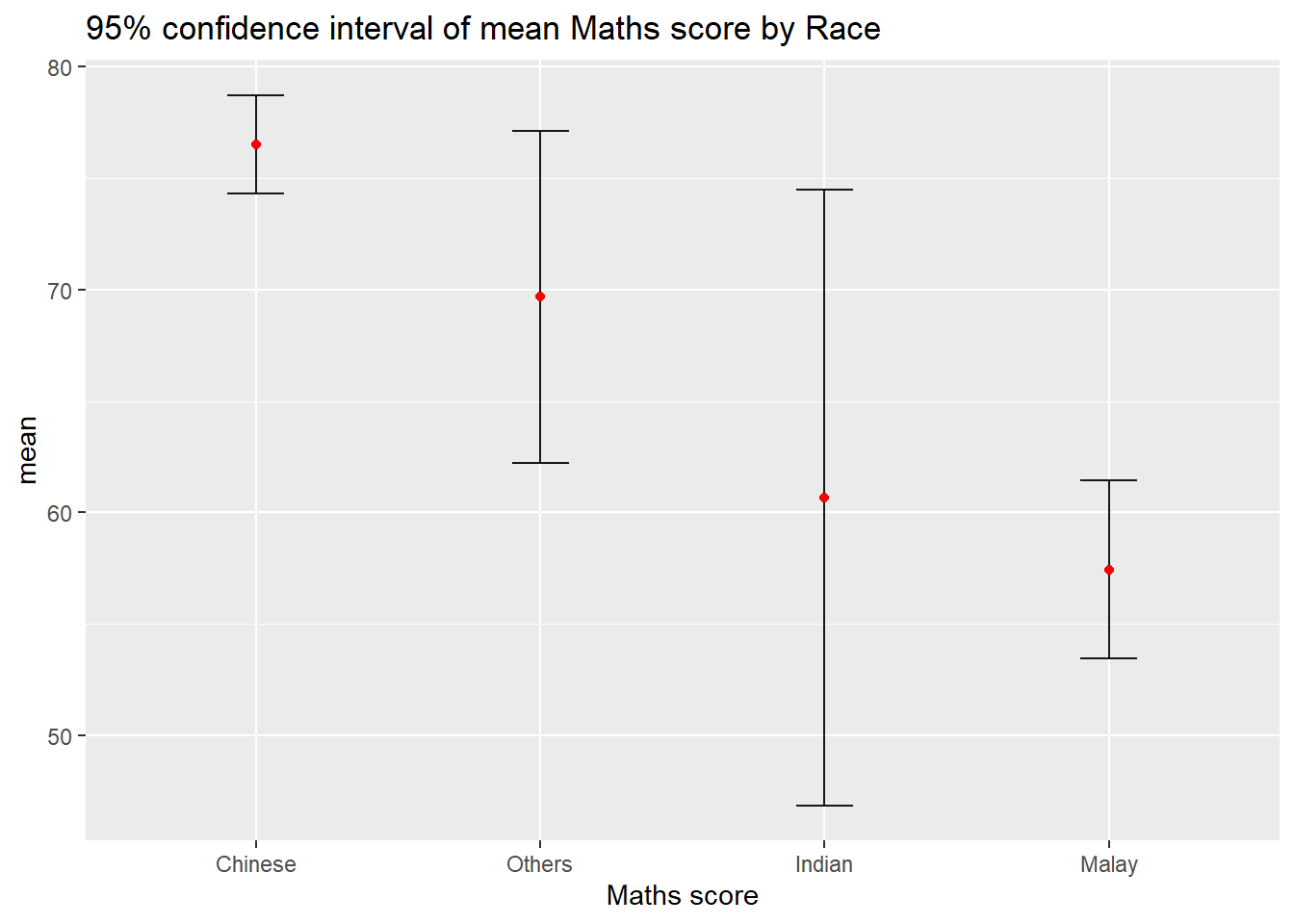
Instead of plotting the standard error bar of point estimates, we can also plot the confidence intervals of mean maths score by race.
ggplot(my_sum) +
geom_errorbar(
aes(x=reorder(RACE, -mean),
ymin=mean-1.96*se,
ymax=mean+1.96*se),
width=0.2,
colour="black",
alpha=0.9,
size=0.5) +
geom_point(aes
(x=RACE,
y=mean),
stat="identity",
color="red",
size = 1.5,
alpha=1) +
labs(x = "Maths score",
title = "95% confidence interval of mean Maths score by Race") Things to learn from the code chunk above:
The confidence intervals are computed by using the formula mean+/-1.96*se.
The error bars is sorted by using the average maths scores.
labs() argument of ggplot2 is used to change the x-axis label.
In this section, you will learn how to plot interactive error bars for the 99% confidence interval of mean maths score by race as shown in the figure below.
shared_df = SharedData$new(my_sum)
bscols(widths = c(5,7),
ggplotly((ggplot(shared_df) +
geom_errorbar(aes(
x=reorder(RACE, -mean),
ymin=mean-2.58*se,
ymax=mean+2.58*se),
width=0.2,
colour="black",
alpha=0.9,
size=0.5) +
geom_point(aes(
x=RACE,
y=mean,
text = paste("Race:", `RACE`,
"<br>N:", `n`,
"<br>Avg. Scores:", round(mean, digits = 2),
"<br>95% CI:[",
round((mean-2.58*se), digits = 2), ",",
round((mean+2.58*se), digits = 2),"]")),
stat="identity",
color="red",
size = 1.5,
alpha=1) +
xlab("Race") +
ylab("Average Scores") +
theme_minimal() +
theme(axis.text.x = element_text(
angle = 45, vjust = 0.5, hjust=1)) +
ggtitle("99% Confidence interval of average /<br>Maths scores by Race")),
tooltip = "text"),
DT::datatable(shared_df,
rownames = FALSE,
class="compact",
width="100%",
options = list(pageLength = 10,
scrollX=T),
colnames = c("No. of pupils",
"Avg Scores",
"Std Dev",
"Std Error")) %>%
formatRound(columns=c('mean', 'sd', 'se'),
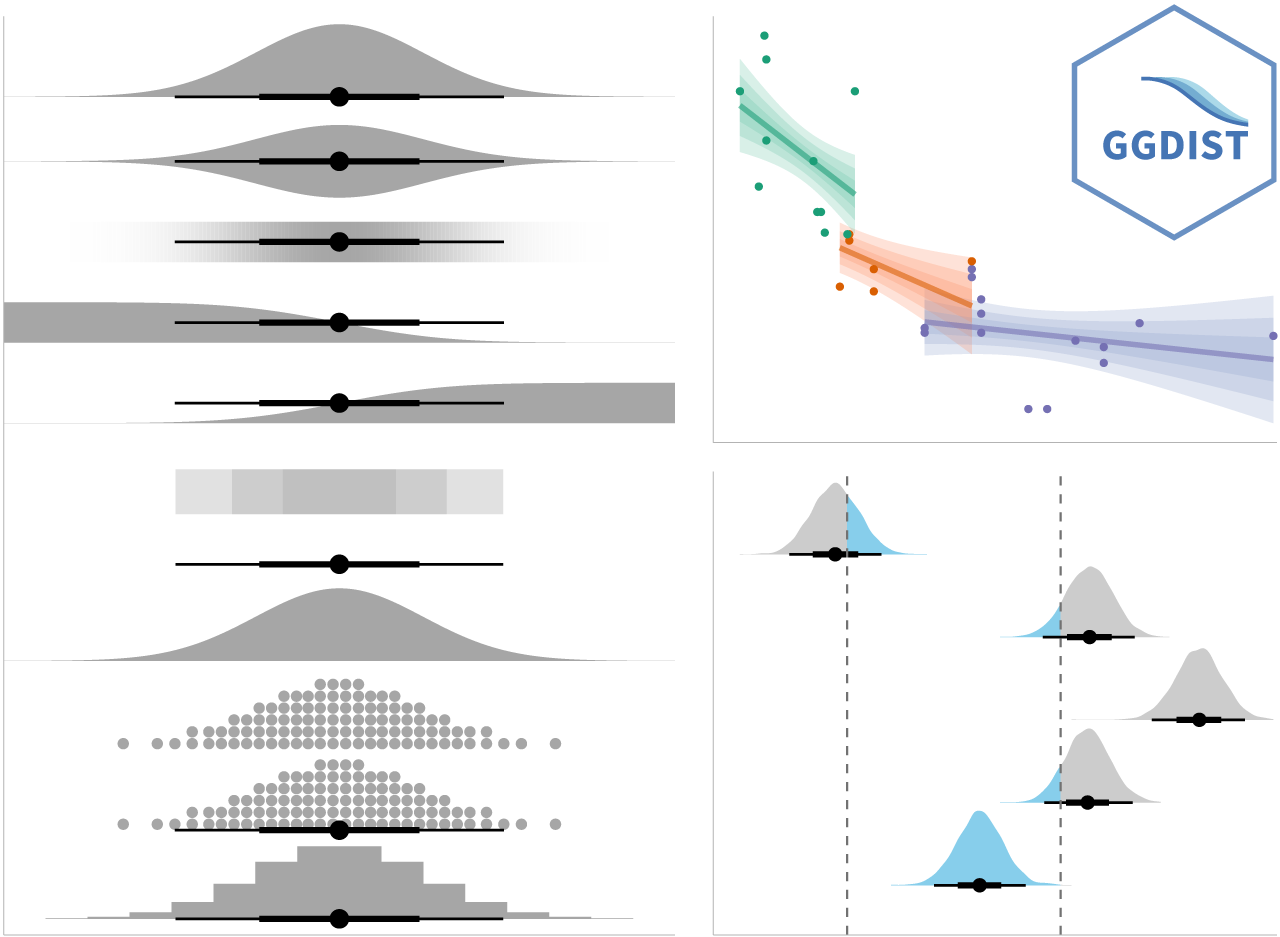
digits=2)) ggdist is an R package that provides a flexible set of ggplot2 geoms and stats designed especially for visualising distributions and uncertainty.
It is designed for both frequentist and Bayesian uncertainty visualization, taking the view that uncertainty visualization can be unified through the perspective of distribution visualization:
for frequentist models, one visualises confidence distributions or bootstrap distributions (see vignette(“freq-uncertainty-vis”));
for Bayesian models, one visualises probability distributions (see the tidybayes package, which builds on top of ggdist).
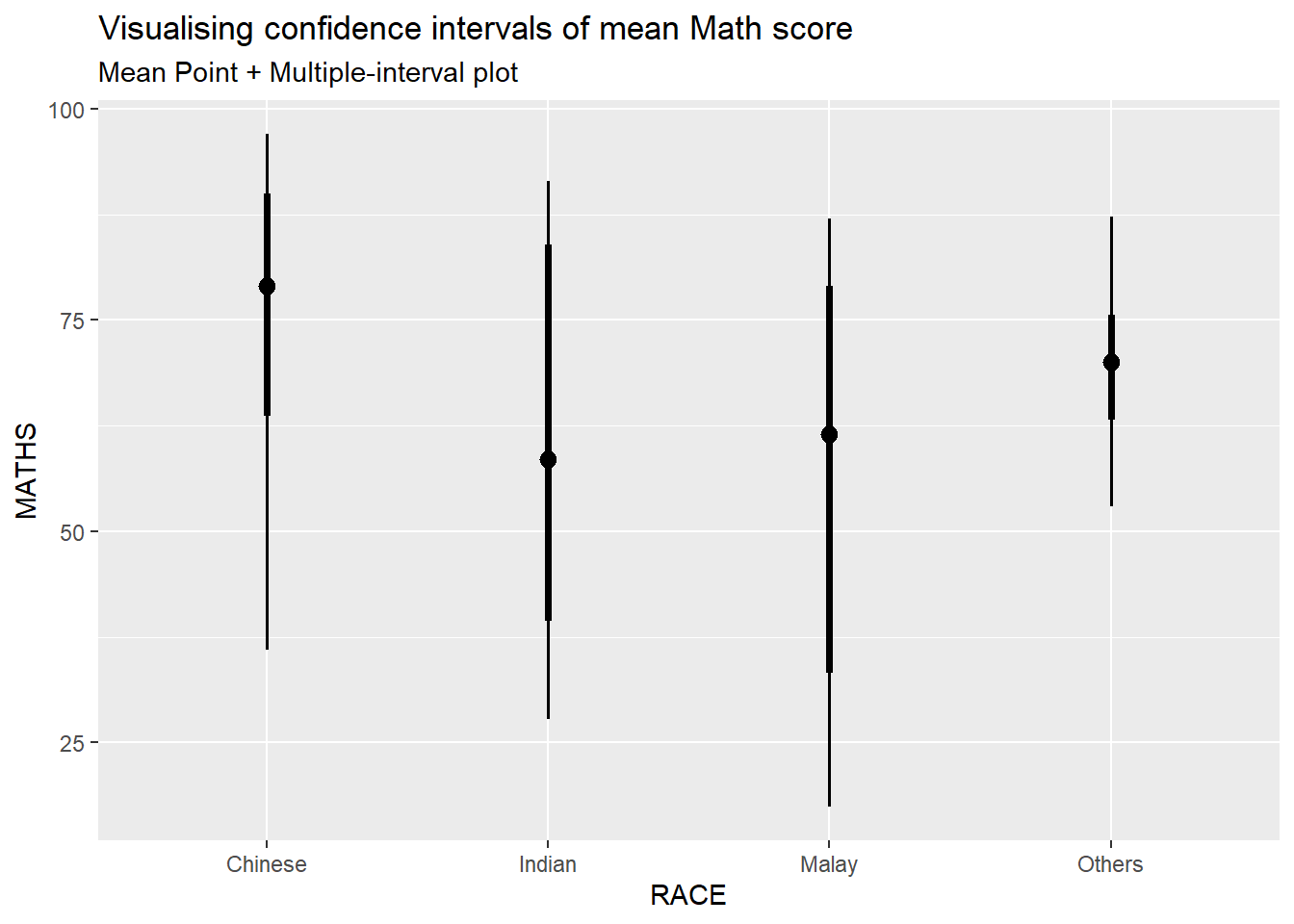
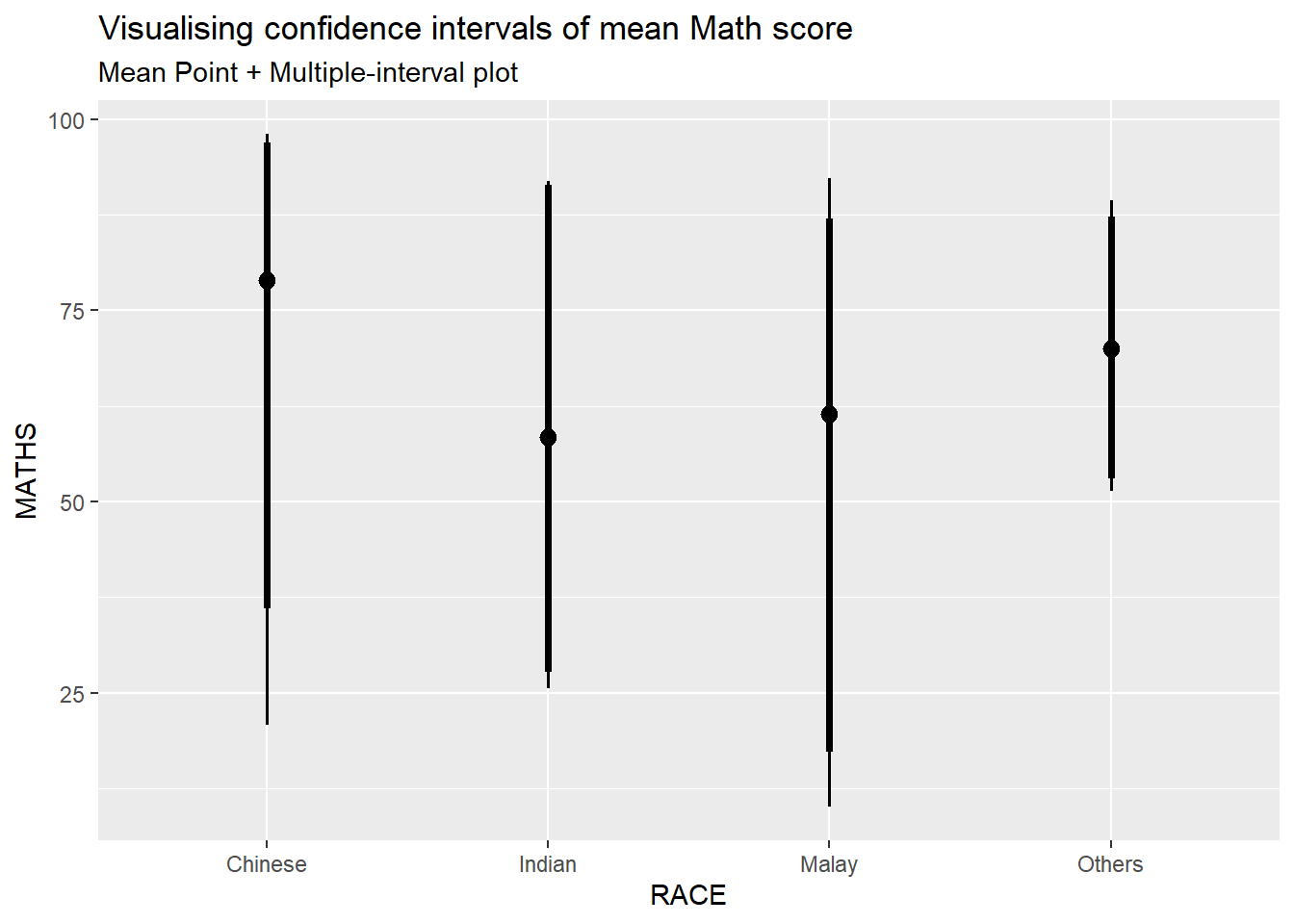
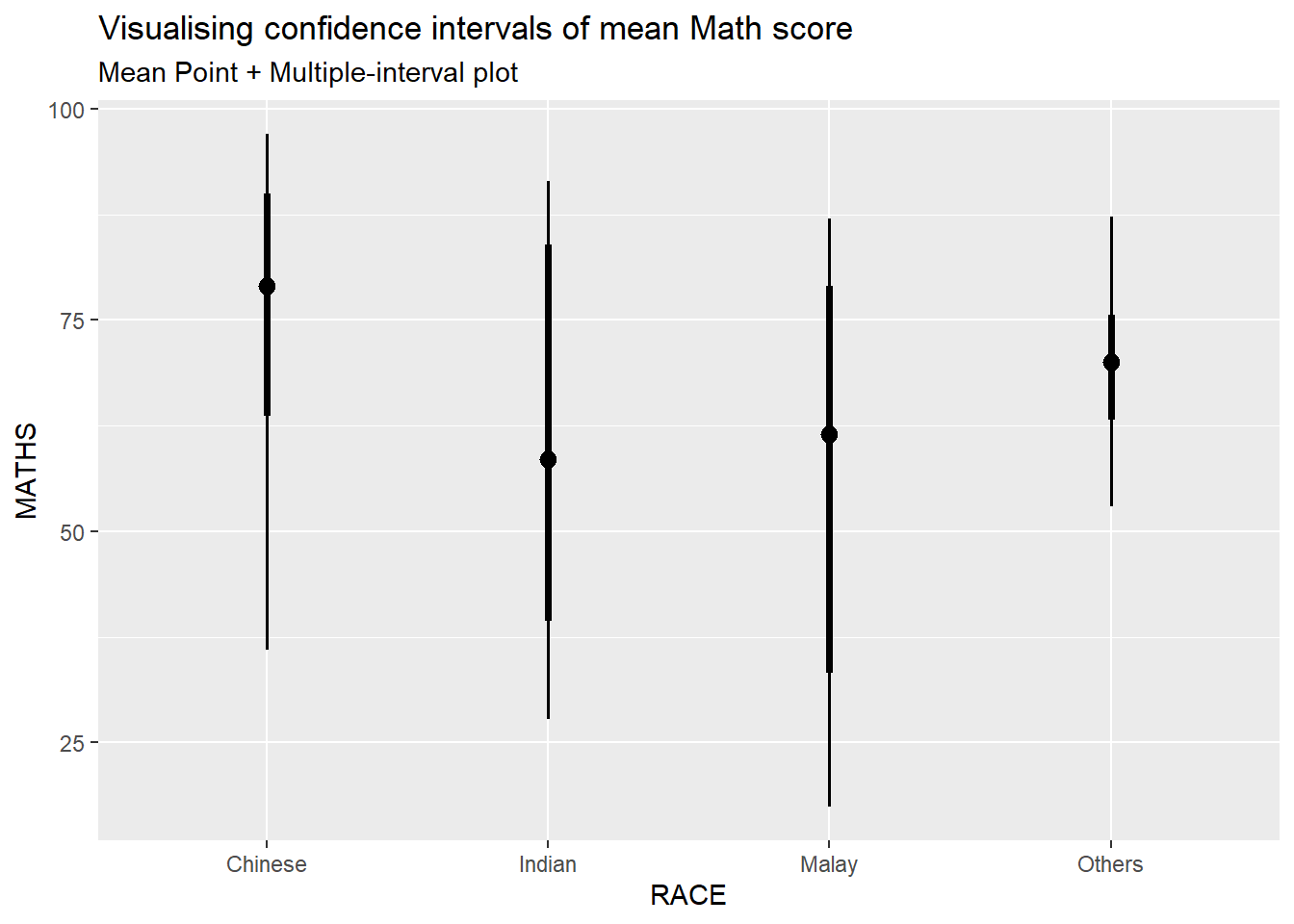
In the code chunk below, stat_pointinterval() of ggdist is used to build a visual for displaying distribution of maths scores by race.
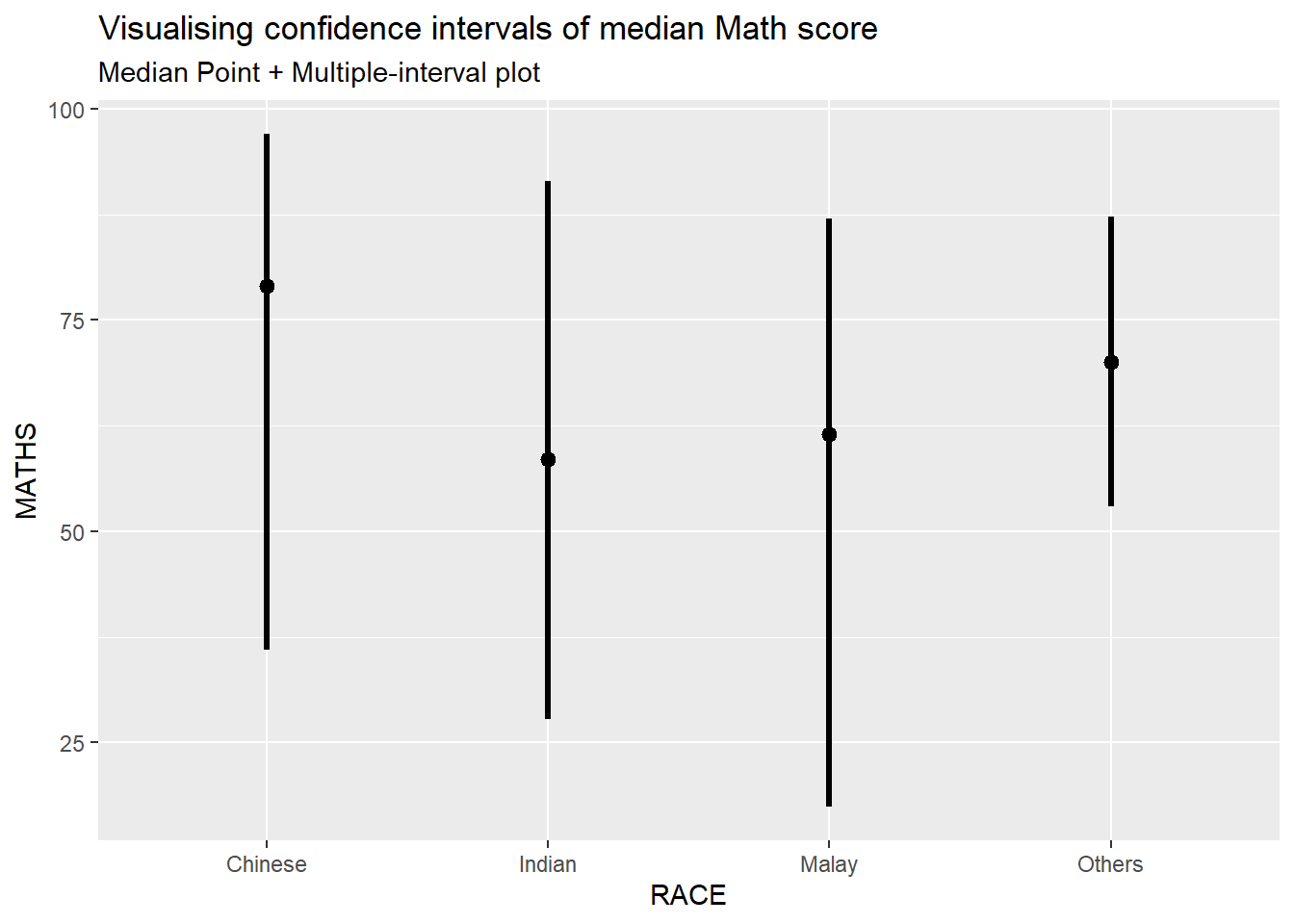
For example, in the code chunk below the following arguments are used:
.width = 0.95
.point = median
.interval = qi
In my own makeover to show 95% and 99% confidence levels, in the code chunk below the following arguments are used:
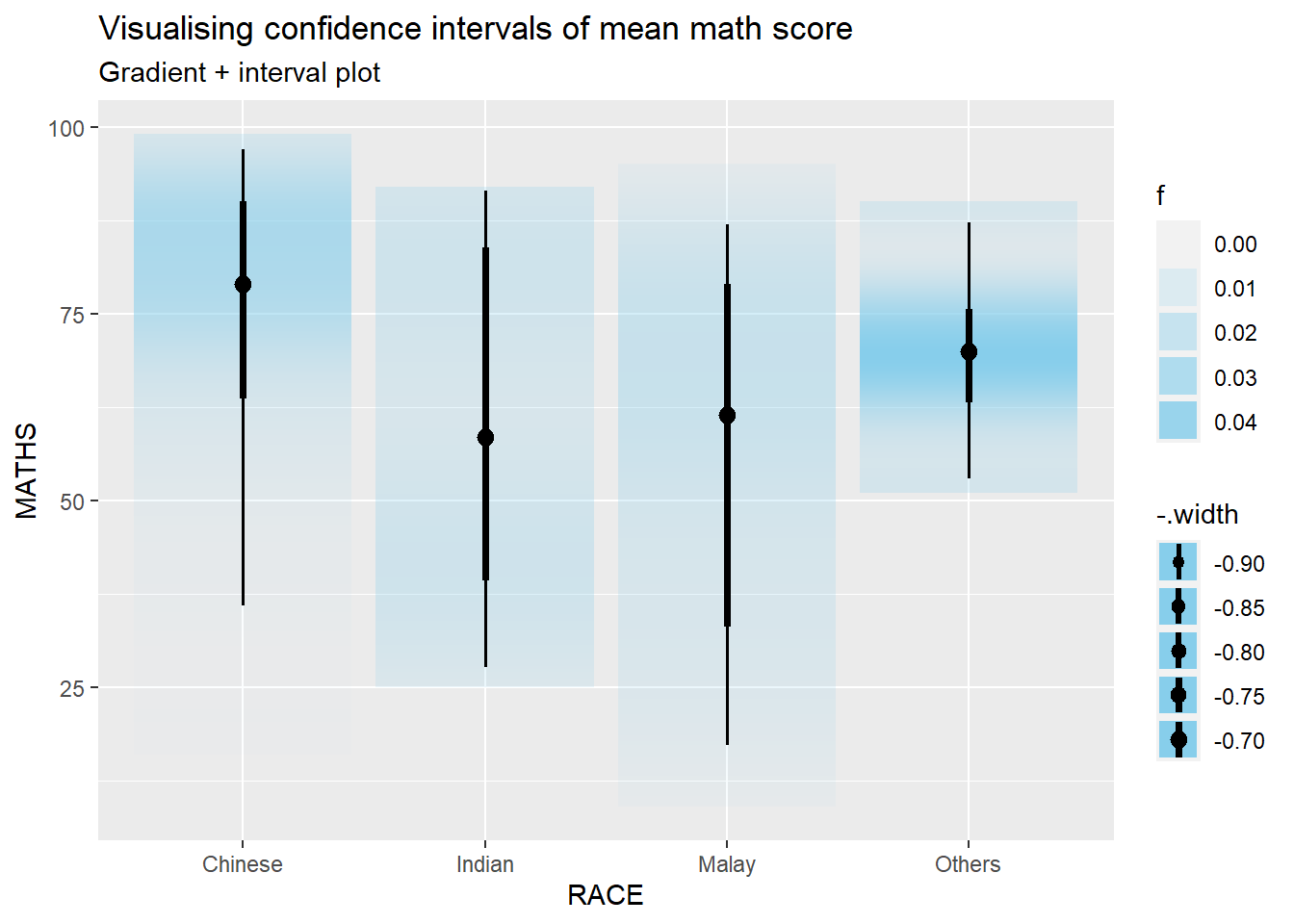
In the code chunk below, stat_gradientinterval() of ggdist is used to build a visual for displaying distribution of maths scores by rac
According to Visualizing uncertainty,

ggplot(data = exam,
(aes(x = factor(RACE), y = MATHS))) +
geom_point(position = position_jitter(
height = 0.3, width = 0.05),
size = 0.4, color = "#0072B2", alpha = 1/2) +
geom_hpline(data = sampler(25, group = RACE), height = 0.6, color = "#D55E00") +
theme_bw() +
# `.draw` is a generated column indicating the sample draw
transition_states(.draw, 1, 3)---
title: "Hands-on Exercise 4c"
subtitle: "Lesson 4c: [Visualising Uncertainty](https://r4va.netlify.app/chap11)"
author: "Victoria Neo"
date: 02/6/2024
date-modified: last-modified
format:
html:
code-fold: true
code-summary: "code block"
code-tools: true
code-copy: true
execute:
warning: false
---
](images/clipboard-2210815851.png){fig-align="left" width="355"}
# Overview Summary
| | |
|--------------------------|----------------------------------------------|
| Work done | Hands-on Exercise 4c |
| Hours taken | ⏱️⏱️ ( hospitalisation leave) \| |
| Questions | 0 |
| How do I feel? | 🤔 |
| What do I think? | Hands-on Exercise 4c was really so interesting! I did not have any prior notion of visualising uncertainty and this was one limitation of Take-home Exercise 01 and 02. How can we move away from simplified summaries or integrate both? |
# 1 Overview Notes
Visualising uncertainty is relatively new in statistical graphics. In this chapter, you will gain hands-on experience on creating statistical graphics for visualising uncertainty. By the end of this chapter you will be able:
- to plot statistics error bars by using ggplot2,
- to plot interactive error bars by combining ggplot2, plotly and DT,
- to create advanced by using ggdist, and
- to create hypothetical outcome plots (HOPs) by using ungeviz package.
::: {.thinkbox .think data-latex="think"}
#### Own Research
According to [Visualizing uncertainty](https://clauswilke.com/dataviz/visualizing-uncertainty.html),
| *One of the most challenging aspects of data visualization is the visualization of uncertainty. When we see a data point drawn in a specific location, we tend to interpret it as a precise representation of the true data value. It is difficult to conceive that a data point could actually lie somewhere it hasn’t been drawn. Yet this scenario is ubiquitous in data visualization. Nearly every data set we work with has some uncertainty, and whether and how we choose to represent this uncertainty can make a major difference in how accurately our audience perceives the meaning of the data.*
Another definition by Nathan Yau in [Visualizing the Uncertainty in Data](https://flowingdata.com/2018/01/08/visualizing-the-uncertainty-in-data/) states that:
| *Statistics is a game where you figure out these uncertainties and make estimated judgements based on your calculations. But standard errors, confidence intervals, and likelihoods often lose their visual space in data graphics, which leads to judgements based on simplified summaries expressed as means, medians, or extremes.*
:::
# 2 Getting Started
## 2: Data
### 2.1 Installing and loading the required libraries
The code chunk below uses p_load() of pacman package to check if the following R packages are installed in the computer. If they are, then they will be launched into R.
- tidyverse, a family of R packages for data science process,
- plotly for creating interactive plot,
- gganimate for creating animation plot,
- DT for displaying interactive html table,
- crosstalk for for implementing cross-widget interactions (currently, linked brushing and filtering), and
- ggdist for visualising distribution and uncertainty.
```{r}
devtools::install_github("wilkelab/ungeviz")
```
```{r}
pacman::p_load(ungeviz, plotly, crosstalk,
DT, ggdist, ggridges,
colorspace, gganimate, tidyverse)
```
### 2.2 Data Set
::: callout-note
This section is taken from [Hands-on_Ex02](Hands-on_Ex/Hands-on_Ex01/Hands-on_Ex01.html) as we are using the same data set.
:::
The data set, *Exam_data.csv,* contains the Year-end examination grades of a cohort of primary 3 students from a local school, and is uploaded as **exam_data**.
#### 2.2.1 Importing exam_data
In the code chunk below, read_csv() of readr package is used to import Exam_data.csv data file into R and save it as an tibble data frame called exam_data.
```{r}
exam <- read_csv("data/Exam_data.csv")
```
# 3: Hands-on Exercise
## 3.1 Visualizing the uncertainty of point estimates: ggplot2 methods
A point estimate is a single number, such as a mean. Uncertainty, on the other hand, is expressed as standard error, confidence interval, or credible interval.
::: callout-note
Don’t confuse the uncertainty of a point estimate with the variation in the sample.
:::
::: {.thinkbox .think data-latex="think"}
#### Own Research
According to [Visualizing uncertainty](https://clauswilke.com/dataviz/visualizing-uncertainty.html),
| *Quantities that describe the population are called **parameters**, and they are generally not knowable. However, we can use a sample to make a guess about the true parameter values, and statisticians refer to such guesses as estimates. The sample mean (or average) is an estimate for the population mean, which is a parameter. The estimates of individual parameter values are also called point estimates, since each can be represented by a point on a line.*
| *A sample will consist of a set of specific observations. The number of the individual observations in the sample is called the sample size. From the sample we can calculate a sample mean and a sample standard deviation, and these will generally differ from the population mean and standard deviation. Finally, we can define a sampling distribution, which is the distribution of estimates we would obtain if we repeated the sampling process many times. The width of the sampling distribution is called the standard error, and it tells us how precise our estimates are. **In other words, the standard error provides a measure of the uncertainty associated with our parameter estimate.** As a general rule, the larger the sample size, the smaller the standard error and thus the less uncertain the estimate.*
| *It is critical that we don’t confuse the standard deviation and the standard error. The standard deviation is a property of the population. It tells us how much spread there is among individual observations we could make. For example, if we consider the population of voting districts, the standard deviation tells us how different different districts are from one another. By contrast, the standard error tells us how precisely we have determined a parameter estimate. If we wanted to estimate the mean voting outcome over all districts, the standard error would tells us how accurate our estimate for the mean is.*
{fig-align="left" width="500"}
:::
In this section, you will learn how to plot error bars of maths scores by race by using data provided in exam tibble data frame.
Firstly, the code chunk below will be used to derive the necessary summary statistics.
```{r}
#| code-fold: show
my_sum <- exam %>%
group_by(RACE) %>%
summarise(
n=n(),
mean=mean(MATHS),
sd=sd(MATHS)
) %>%
mutate(se=sd/sqrt(n-1))
```
- `group_by()` of **dplyr** package is used to group the observation by RACE,
- `summarise()` is used to compute the count of observations, mean, standard deviation
- `mutate()` is used to derive standard error of Maths by RACE, and
- the output is save as a tibble data table called *my_sum*.
::: {.kambox .kam data-latex="kam"}
#### What did Prof Kam say?
Things to learn from the code chunk above:
- `group_by()` of **dplyr** package is used to group the observation by RACE,
- `summarise()` is used to compute the count of observations, mean, standard deviation
- `mutate()` is used to derive standard error of Maths by RACE, and
- the output is save as a tibble data table called *my_sum*.
:::
Next, the code chunk below will be used to display *my_sum* tibble data frame in an html table format.
```{r}
knitr::kable(head(my_sum), format = 'html')
```
### 3.1.1 **Plotting standard error bars of point estimates**
Now we are ready to plot the standard error bars of mean maths score by race as shown below.
::: panel-tabset
## The plot
```{r}
#| echo: false
#| warning: false
ggplot(my_sum) +
geom_errorbar(
aes(x=RACE,
ymin=mean-se,
ymax=mean+se),
width=0.2,
colour="black",
alpha=0.9,
size=0.5) +
geom_point(aes
(x=RACE,
y=mean),
stat="identity",
color="red",
size = 1.5,
alpha=1) +
ggtitle("Standard error of mean Maths score by Race")
```
## The code chunk
```{r}
#| warning: false
#| code-fold: show
#| eval: false
ggplot(my_sum) +
geom_errorbar(
aes(x=RACE,
ymin=mean-se,
ymax=mean+se),
width=0.2,
colour="black",
alpha=0.9,
size=0.5) +
geom_point(aes
(x=RACE,
y=mean),
stat="identity",
color="red",
size = 1.5,
alpha=1) +
ggtitle("Standard error of mean Maths score by Race")
```
:::
::: {.kambox .kam data-latex="kam"}
#### What did Prof Kam say?
Things to learn from the code chunk above:
- The error bars are computed by using the formula mean+/-se.
- For `geom_point()`, it is important to indicate *stat=“identity”*.
:::
### 3.1.2 **Plotting confidence interval of point estimates**
Instead of plotting the standard error bar of point estimates, we can also plot the confidence intervals of mean maths score by race.
::: panel-tabset
## The plot
```{r}
#| echo: false
#| warning: false
ggplot(my_sum) +
geom_errorbar(
aes(x=reorder(RACE, -mean),
ymin=mean-1.96*se,
ymax=mean+1.96*se),
width=0.2,
colour="black",
alpha=0.9,
size=0.5) +
geom_point(aes
(x=RACE,
y=mean),
stat="identity",
color="red",
size = 1.5,
alpha=1) +
labs(x = "Maths score",
title = "95% confidence interval of mean Maths score by Race")
```
## The code chunk
```{r}
#| warning: false
#| code-fold: show
#| eval: false
ggplot(my_sum) +
geom_errorbar(
aes(x=reorder(RACE, -mean),
ymin=mean-1.96*se,
ymax=mean+1.96*se),
width=0.2,
colour="black",
alpha=0.9,
size=0.5) +
geom_point(aes
(x=RACE,
y=mean),
stat="identity",
color="red",
size = 1.5,
alpha=1) +
labs(x = "Maths score",
title = "95% confidence interval of mean Maths score by Race")
```
:::
::: {.kambox .kam data-latex="kam"}
#### What did Prof Kam say?
Things to learn from the code chunk above:
- The confidence intervals are computed by using the formula mean+/-1.96\*se.
- The error bars is sorted by using the average maths scores.
- `labs()` argument of ggplot2 is used to change the x-axis label.
:::
### 3.1.3 **Visualizing the uncertainty of point estimates with interactive error bars**
In this section, you will learn how to plot interactive error bars for the 99% confidence interval of mean maths score by race as shown in the figure below.
::: panel-tabset
## The plot
```{r}
#| echo: false
#| warning: false
shared_df = SharedData$new(my_sum)
bscols(widths = c(5,7),
ggplotly((ggplot(shared_df) +
geom_errorbar(aes(
x=reorder(RACE, -mean),
ymin=mean-2.58*se,
ymax=mean+2.58*se),
width=0.2,
colour="black",
alpha=0.9,
size=0.5) +
geom_point(aes(
x=RACE,
y=mean,
text = paste("Race:", `RACE`,
"<br>N:", `n`,
"<br>Avg. Scores:", round(mean, digits = 2),
"<br>95% CI:[",
round((mean-2.58*se), digits = 2), ",",
round((mean+2.58*se), digits = 2),"]")),
stat="identity",
color="red",
size = 1.5,
alpha=1) +
xlab("Race") +
ylab("Average Scores") +
theme_minimal() +
theme(axis.text.x = element_text(
angle = 45, vjust = 0.5, hjust=1)) +
ggtitle("99% Confidence interval of average /<br>Maths scores by Race")),
tooltip = "text"),
DT::datatable(shared_df,
rownames = FALSE,
class="compact",
width="100%",
options = list(pageLength = 10,
scrollX=T),
colnames = c("No. of pupils",
"Avg Scores",
"Std Dev",
"Std Error")) %>%
formatRound(columns=c('mean', 'sd', 'se'),
digits=2))
```
## The code chunk
```{r}
#| warning: false
#| code-fold: show
#| eval: false
shared_df = SharedData$new(my_sum)
bscols(widths = c(5,7),
ggplotly((ggplot(shared_df) +
geom_errorbar(aes(
x=reorder(RACE, -mean),
ymin=mean-2.58*se,
ymax=mean+2.58*se),
width=0.2,
colour="black",
alpha=0.9,
size=0.5) +
geom_point(aes(
x=RACE,
y=mean,
text = paste("Race:", `RACE`,
"<br>N:", `n`,
"<br>Avg. Scores:", round(mean, digits = 2),
"<br>95% CI:[",
round((mean-2.58*se), digits = 2), ",",
round((mean+2.58*se), digits = 2),"]")),
stat="identity",
color="red",
size = 1.5,
alpha=1) +
xlab("Race") +
ylab("Average Scores") +
theme_minimal() +
theme(axis.text.x = element_text(
angle = 45, vjust = 0.5, hjust=1)) +
ggtitle("99% Confidence interval of average /<br>Maths scores by Race")),
tooltip = "text"),
DT::datatable(shared_df,
rownames = FALSE,
class="compact",
width="100%",
options = list(pageLength = 10,
scrollX=T),
colnames = c("No. of pupils",
"Avg Scores",
"Std Dev",
"Std Error")) %>%
formatRound(columns=c('mean', 'sd', 'se'),
digits=2))
```
:::
## 3.2 **Visualising Uncertainty: ggdist package**
- [**ggdist**](https://mjskay.github.io/ggdist/) is an R package that provides a flexible set of ggplot2 geoms and stats designed especially for visualising distributions and uncertainty.
- It is designed for both frequentist and Bayesian uncertainty visualization, taking the view that uncertainty visualization can be unified through the perspective of distribution visualization:
- for frequentist models, one visualises confidence distributions or bootstrap distributions (see vignette(“freq-uncertainty-vis”));
- for Bayesian models, one visualises probability distributions (see the tidybayes package, which builds on top of ggdist).
{fig-align="left" width="503"}
### 3.2.1 **Visualizing the uncertainty of point estimates: ggdist methods**
In the code chunk below, [`stat_pointinterval()`](https://mjskay.github.io/ggdist/reference/stat_pointinterval.html) of **ggdist** is used to build a visual for displaying distribution of maths scores by race.
::: panel-tabset
## The plot
```{r}
#| echo: false
#| warning: false
exam %>%
ggplot(aes(x = RACE,
y = MATHS)) +
stat_pointinterval() +
labs(
title = "Visualising confidence intervals of mean Math score",
subtitle = "Mean Point + Multiple-interval plot")
```
## The code chunk
```{r}
#| warning: false
#| code-fold: show
#| eval: false
exam %>%
ggplot(aes(x = RACE,
y = MATHS)) +
stat_pointinterval() +
labs(
title = "Visualising confidence intervals of mean Math score",
subtitle = "Mean Point + Multiple-interval plot")
```
:::
For example, in the code chunk below the following arguments are used:
- .width = 0.95
- .point = median
- .interval = qi
::: panel-tabset
## The plot
```{r}
#| echo: false
#| warning: false
exam %>%
ggplot(aes(x = RACE, y = MATHS)) +
stat_pointinterval(.width = 0.95,
.point = median,
.interval = qi) +
labs(
title = "Visualising confidence intervals of median Math score",
subtitle = "Median Point + Multiple-interval plot")
```
## The code chunk
```{r}
#| warning: false
#| code-fold: show
#| eval: false
exam %>%
ggplot(aes(x = RACE, y = MATHS)) +
stat_pointinterval(.width = 0.95,
.point = median,
.interval = qi) +
labs(
title = "Visualising confidence intervals of median Math score",
subtitle = "Median Point + Multiple-interval plot")
```
:::
In my own makeover to show 95% and 99% confidence levels, in the code chunk below the following arguments are used:
- .width = 0.95 and 0.99
::: panel-tabset
## The plot
```{r}
#| echo: false
#| warning: false
exam %>%
ggplot(aes(x = RACE,
y = MATHS)) +
stat_pointinterval(
.width = c(0.95, 0.99),
show.legend = FALSE) +
labs(
title = "Visualising confidence intervals of mean Math score",
subtitle = "Mean Point + Multiple-interval plot")
```
## The code chunk
```{r}
#| warning: false
#| code-fold: show
#| eval: false
exam %>%
ggplot(aes(x = RACE,
y = MATHS)) +
stat_pointinterval(
.width = c(0.95, 0.99),
show.legend = FALSE) +
labs(
title = "Visualising confidence intervals of mean Math score",
subtitle = "Mean Point + Multiple-interval plot")
```
:::
### 3.2.2 **Visualizing the uncertainty of point estimates: ggdist methods**
::: panel-tabset
## The plot
```{r}
#| echo: false
#| warning: false
exam %>%
ggplot(aes(x = RACE,
y = MATHS)) +
stat_pointinterval(
show.legend = FALSE) +
labs(
title = "Visualising confidence intervals of mean Math score",
subtitle = "Mean Point + Multiple-interval plot")
```
## The code chunk
```{r}
#| warning: false
#| code-fold: show
#| eval: false
exam %>%
ggplot(aes(x = RACE,
y = MATHS)) +
stat_pointinterval(
show.legend = FALSE) +
labs(
title = "Visualising confidence intervals of mean Math score",
subtitle = "Mean Point + Multiple-interval plot")
```
:::
### 3.2.3 **Visualizing the uncertainty of point estimates: ggdist methods**
In the code chunk below, [`stat_gradientinterval()`](https://mjskay.github.io/ggdist/reference/stat_gradientinterval.html) of **ggdist** is used to build a visual for displaying distribution of maths scores by rac
::: panel-tabset
## The plot
```{r}
#| echo: false
#| warning: false
exam %>%
ggplot(aes(x = RACE,
y = MATHS)) +
stat_gradientinterval(
fill = "skyblue",
show.legend = TRUE
) +
labs(
title = "Visualising confidence intervals of mean math score",
subtitle = "Gradient + interval plot")
```
## The code chunk
```{r}
#| warning: false
#| code-fold: show
#| eval: false
exam %>%
ggplot(aes(x = RACE,
y = MATHS)) +
stat_gradientinterval(
fill = "skyblue",
show.legend = TRUE
) +
labs(
title = "Visualising confidence intervals of mean math score",
subtitle = "Gradient + interval plot")
```
:::
## 3.3 **Visualising Uncertainty with Hypothetical Outcome Plots (HOPs)**
::: {.thinkbox .think data-latex="think"}
#### Own Research
According to [Visualizing uncertainty](https://clauswilke.com/dataviz/visualizing-uncertainty.html),
| *All static visualizations of uncertainty suffer from the problem that viewers may interpret some aspect of the uncertainty visualization as a deterministic feature of the data (deterministic construal error). We can avoid this problem by visualizing uncertainty through animation, by cycling through a number of different but equally likely plots. This kind of a visualization is called a hypothetical outcome plot (Hullman, Resnick, and Adar [2015](https://clauswilke.com/dataviz/visualizing-uncertainty.html#ref-Hullman_et_al_2015)) or HOP.*
:::
```{r}
library(ungeviz)
```
::: panel-tabset
## The plot
```{r}
#| echo: false
#| warning: false
ggplot(data = exam,
(aes(x = factor(RACE), y = MATHS))) +
geom_point(position = position_jitter(
height = 0.3, width = 0.05),
size = 0.4, color = "#0072B2", alpha = 1/2) +
geom_hpline(data = sampler(25, group = RACE), height = 0.6, color = "#D55E00") +
theme_bw() +
# `.draw` is a generated column indicating the sample draw
transition_states(.draw, 1, 3)
```
## The code chunk
```{r}
#| warning: false
#| code-fold: show
#| eval: false
ggplot(data = exam,
(aes(x = factor(RACE), y = MATHS))) +
geom_point(position = position_jitter(
height = 0.3, width = 0.05),
size = 0.4, color = "#0072B2", alpha = 1/2) +
geom_hpline(data = sampler(25, group = RACE), height = 0.6, color = "#D55E00") +
theme_bw() +
# `.draw` is a generated column indicating the sample draw
transition_states(.draw, 1, 3)
```
:::