ISS608-VAA
  • ✌️ Hands-on Exercises
    • Hands-on Exercise 1
    • Hands-on Exercise 2
    • Hands-on Exercise 3a
    • Hands-on Exercise 3b
    • Hands-on Exercise 4a
    • Hands-on Exercise 4b
    • Hands-on Exercise 4c
    • Hands-on Exercise 4d
    • Hands-on Exercise 5
    • Hands-on Exercise 6
    • Hands-on Exercise 8a
    • Hands-on Exercise 8b
    • Hands-on Exercise 8c
    • Hands-on Exercise 9
    • Hands-on Exercise 10
  • 👨🏻‍🏫In-class Exercises
    • In-class Exercise 1
    • In-class Exercise 6
    • In-class Exercise 7
    • In-class Exercise 9
  • 🏠 Take-home Exercises
    • Take-home Exercise 1
    • Take-home Exercise 2
    • Take-home Exercise 3
    • Take-home Exercise 4
  • Home
  • My VAA Journey
  • Dictionary

On this page

  • 1 Overview
    • 1.1 Learning outcomes
  • 2 Getting Started
    • 2.1 Installing and loading the required libraries
    • 2.2 Data
      • 2.2.1 Importing Data
  • 3 Basic Choropleth Mapping
    • 3.1 Visualising distribution of functional water point
    • 3.2 Choropleth Map for Rates
      • 3.2.1 Deriving Proportion of Functional Water Points and Non-Functional Water Points
      • 3.2.2 Plotting map of rate
    • 3.3 Extreme Value Maps
      • 3.3.1 Percentile Map
      • 3.3.2 Box map

Hands-on Exercise 7c

  • Show All Code
  • Hide All Code

  • View Source

Lesson 7c: Analytical Mapping

Author

Victoria Neo

Published

February 28, 2024

Modified

March 22, 2024

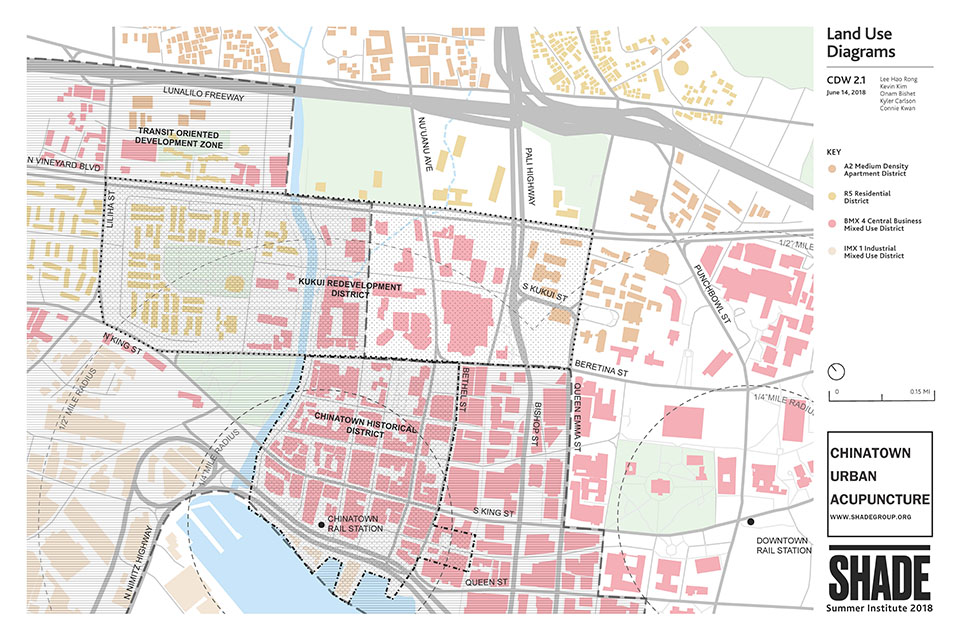
Taken from SHADE

1 Overview

In this in-class exercise, you will gain hands-on experience on using appropriate R methods to plot analytical maps.

1.1 Learning outcomes

By the end of this in-class exercise, you will be able to use appropriate functions of tmap and tidyverse to perform the following tasks:

  • Importing geospatial data in rds format into R environment.

  • Creating cartographic quality choropleth maps by using appropriate tmap functions.

  • Creating rate map

  • Creating percentile map

  • Creating boxmap

2 Getting Started

2.1 Installing and loading the required libraries

code block
pacman::p_load(sf, tmap, tidyverse)

2.2 Data

For the purpose of this hands-on exercise, a prepared data set called NGA_wp.rds will be used. The data set is a polygon feature data.frame providing information on water point of Nigeria at the LGA level. You can find the data set in the rds sub-direct of the hands-on data folder.

2.2.1 Importing Data

The code chunk below uses read_csv() function of readr package to import SGPools_svy21.csv into R as a tibble data frame called sgpools.

code block
NGA_wp <- read_rds("data/rds/NGA_wp.rds")

After importing the data file into R, it is important for us to examine if the data file has been imported correctly.

The code chunk below shows list() is used to do the job.

code block
list(NGA_wp) 
[[1]]
Simple feature collection with 774 features and 8 fields
Geometry type: MULTIPOLYGON
Dimension:     XY
Bounding box:  xmin: 26662.71 ymin: 30523.38 xmax: 1344157 ymax: 1096029
Projected CRS: Minna / Nigeria Mid Belt
First 10 features:
          ADM2_EN ADM2_PCODE                   ADM1_EN ADM1_PCODE
1       Aba North   NG001001                      Abia      NG001
2       Aba South   NG001002                      Abia      NG001
3          Abadam   NG008001                     Borno      NG008
4           Abaji   NG015001 Federal Capital Territory      NG015
5            Abak   NG003001                 Akwa Ibom      NG003
6       Abakaliki   NG011001                    Ebonyi      NG011
7  Abeokuta North   NG028001                      Ogun      NG028
8  Abeokuta South   NG028002                      Ogun      NG028
9             Abi   NG009001               Cross River      NG009
10    Aboh-Mbaise   NG017001                       Imo      NG017
                         geometry total_wp wp_functional wp_nonfunctional
1  MULTIPOLYGON (((548795.5 11...       17             7                9
2  MULTIPOLYGON (((547286.1 11...       71            29               35
3  MULTIPOLYGON (((1248985 104...        0             0                0
4  MULTIPOLYGON (((510864.9 57...       57            23               34
5  MULTIPOLYGON (((594269 1209...       48            23               25
6  MULTIPOLYGON (((660767 2522...      233            82               42
7  MULTIPOLYGON (((78621.56 37...       34            16               15
8  MULTIPOLYGON (((106627.7 35...      119            72               33
9  MULTIPOLYGON (((632244.2 21...      152            79               62
10 MULTIPOLYGON (((540081.3 15...       66            18               26
   wp_unknown
1           1
2           7
3           0
4           0
5           0
6         109
7           3
8          14
9          11
10         22

3 Basic Choropleth Mapping

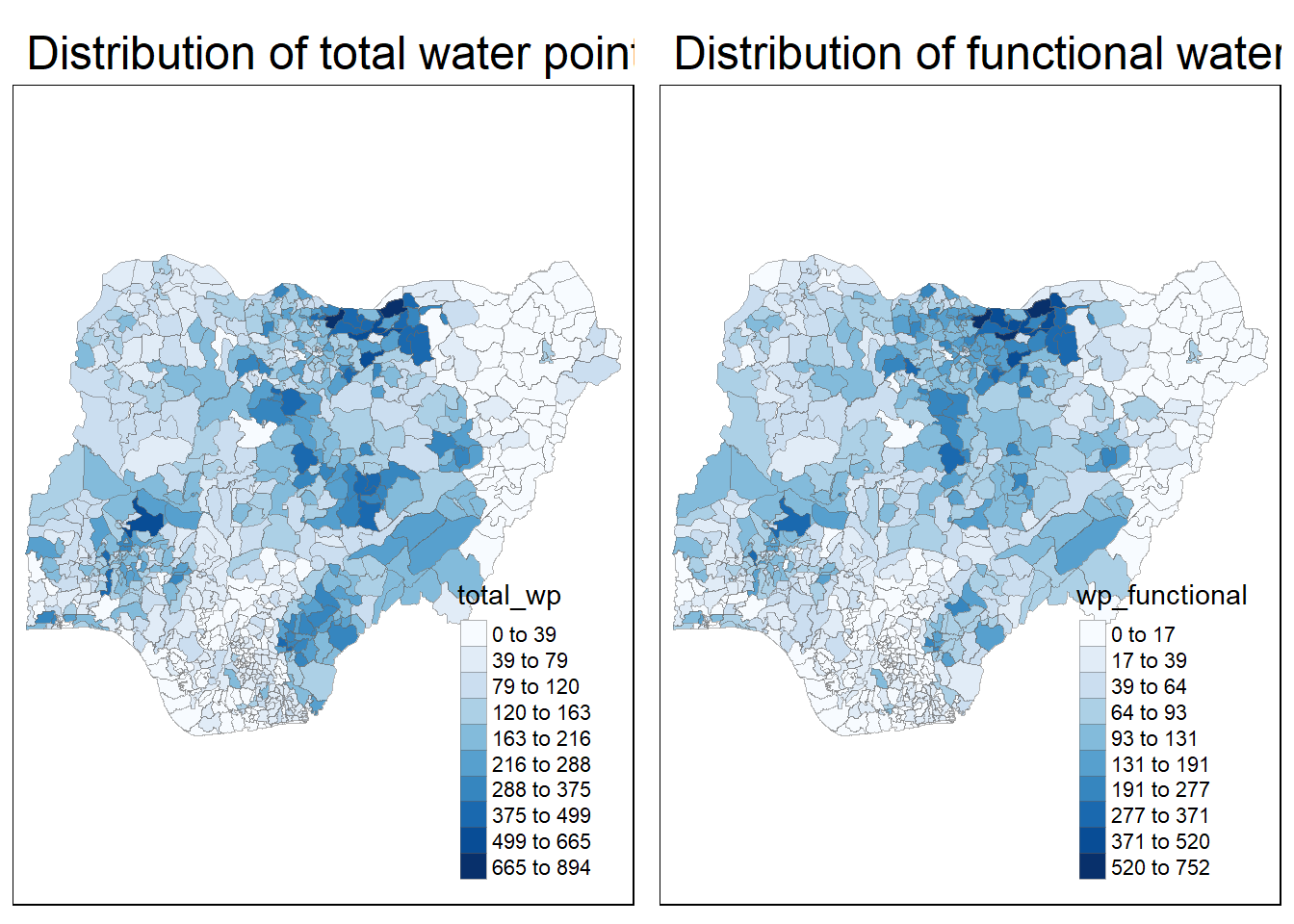
3.1 Visualising distribution of functional water point

The code chunks below are used to create an interactive point symbol map.

code block
p1 <- tm_shape(NGA_wp)+
  tm_fill("wp_functional",
          n = 10,
          style = "jenks",
          palette = "Blues") +
  tm_borders(lwd = 0.1,
             alpha = 0.5) +
  tm_layout(main.title = "Distribution of functional water point by LGAs",
            legend.outside = FALSE)
code block
p2 <- tm_shape(NGA_wp)+
  tm_fill("total_wp",
          n = 10,
          style = "jenks",
          palette = "Blues") +
  tm_borders(lwd = 0.1,
             alpha = 0.5) +
  tm_layout(main.title = "Distribution of total water point by LGAs",
            legend.outside = FALSE)
code block
tmap_arrange(p2, p1, nrow = 1)

3.2 Choropleth Map for Rates

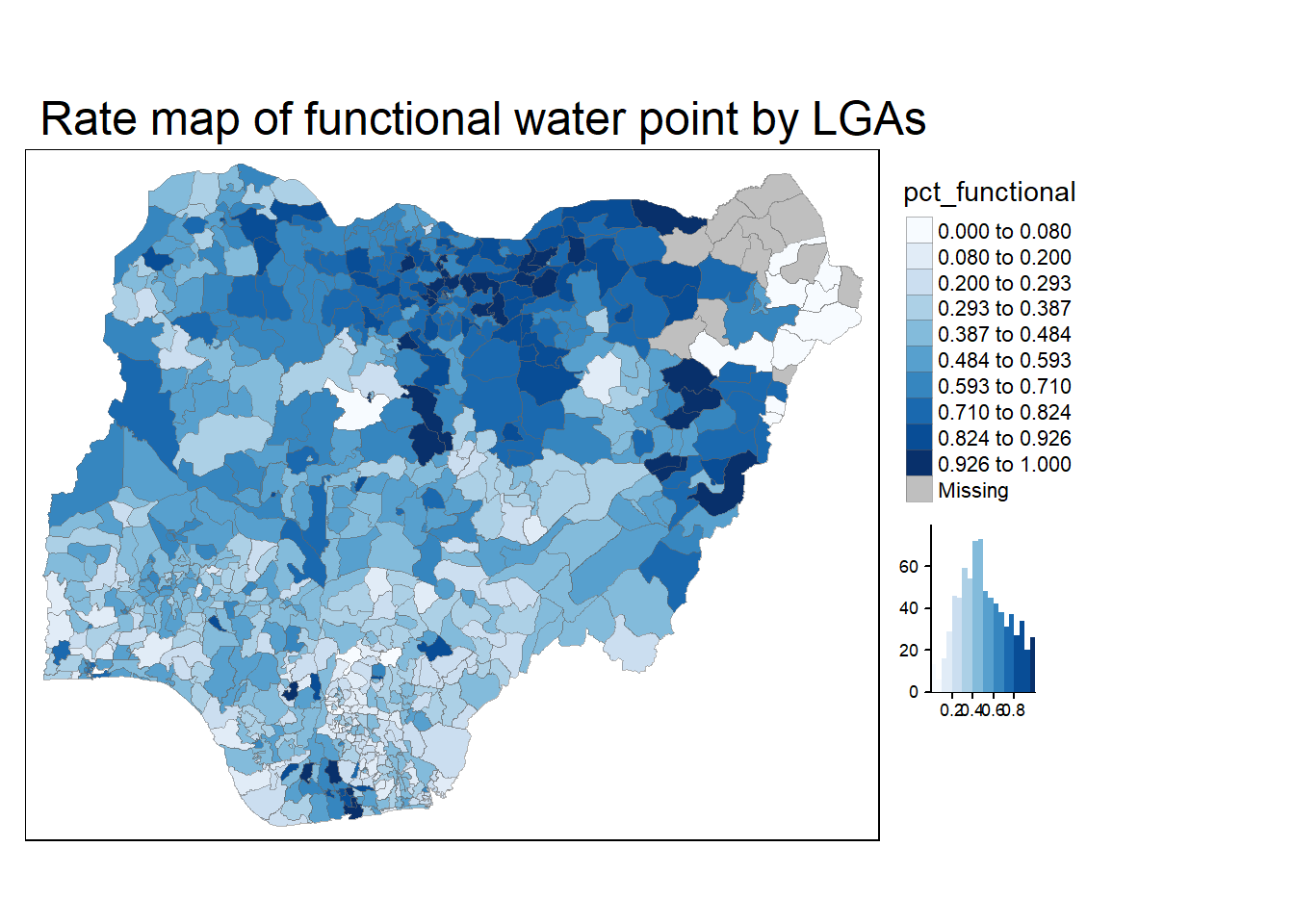
In much of our readings we have now seen the importance to map rates rather than counts of things, and that is for the simple reason that water points are not equally distributed in space. That means that if we do not account for how many water points are somewhere, we end up mapping total water point size rather than our topic of interest.

3.2.1 Deriving Proportion of Functional Water Points and Non-Functional Water Points

We will tabulate the proportion of functional water points and the proportion of non-functional water points in each LGA. In the following code chunk, mutate() from dplyr package is used to derive two fields, namely pct_functional and pct_nonfunctional.

code block
NGA_wp <- NGA_wp %>%
  mutate(pct_functional = wp_functional/total_wp) %>%
  mutate(pct_nonfunctional = wp_nonfunctional/total_wp)

3.2.2 Plotting map of rate

Plot a choropleth map showing the distribution of percentage functional water point by LGA.

code block
tm_shape(NGA_wp)+
  tm_fill("pct_functional",
          n = 10,
          style = "jenks",
          palette = "Blues",
          legend.hist = TRUE) +
  tm_borders(lwd = 0.1,
             alpha = 0.5) +
  tm_layout(main.title = "Rate map of functional water point by LGAs",
            legend.outside = TRUE)
3.3 Extreme Value Maps

Extreme value maps are variations of common choropleth maps where the classification is designed to highlight extreme values at the lower and upper end of the scale, with the goal of identifying outliers. These maps were developed in the spirit of spatializing EDA, i.e., adding spatial features to commonly used approaches in non-spatial EDA (Anselin 1994).

3.3.1 Percentile Map

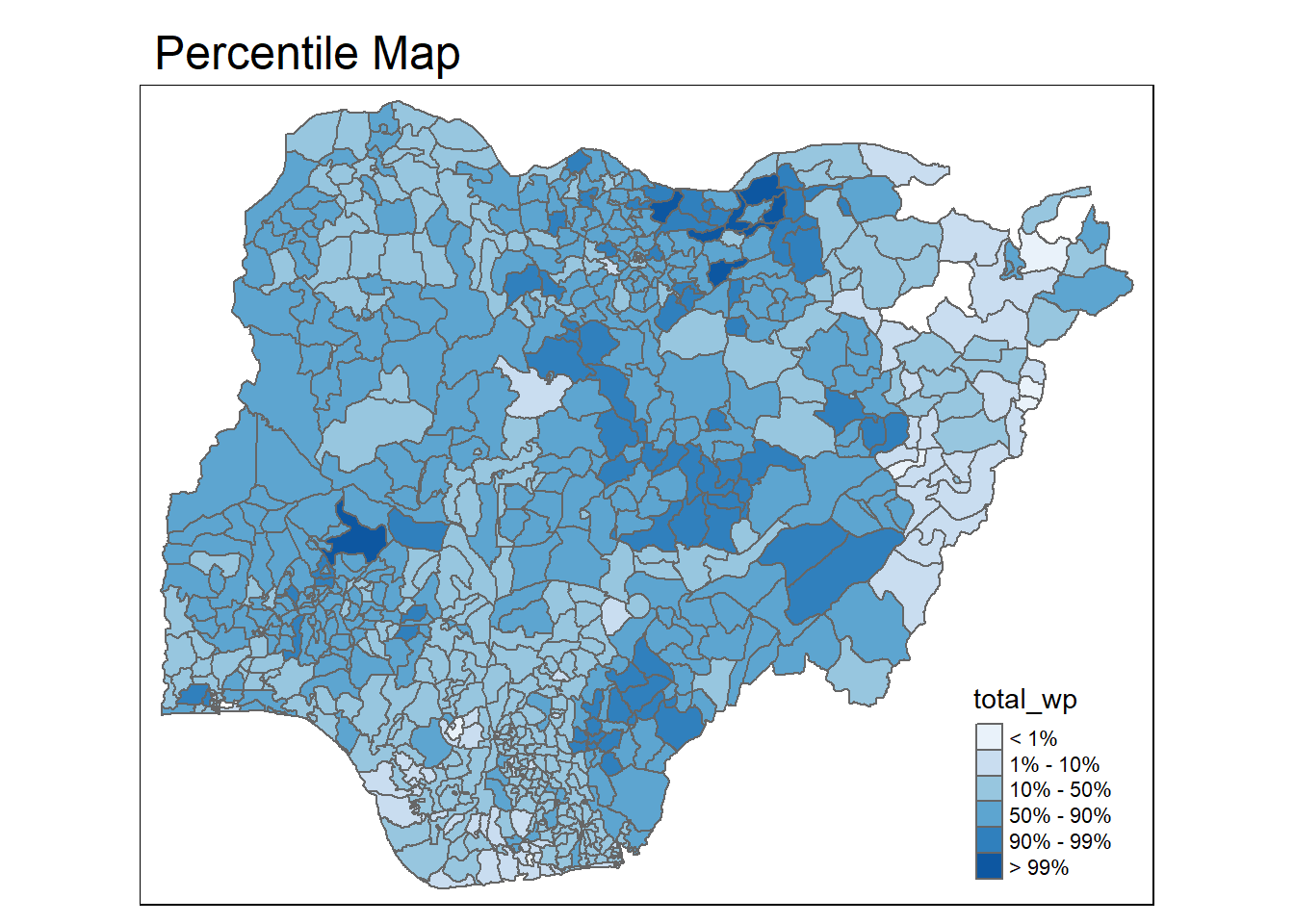
The percentile map is a special type of quantile map with six specific categories: 0-1%,1-10%, 10-50%,50-90%,90-99%, and 99-100%. The corresponding breakpoints can be derived by means of the base R quantile command, passing an explicit vector of cumulative probabilities as c(0,.01,.1,.5,.9,.99,1). Note that the begin and endpoint need to be included.

3.3.1.1 Data Preparation

Step 1: Exclude records with NA by using the code chunk below.

code block
NGA_wp <- NGA_wp %>%
  drop_na()

Step 2: Creating customised classification and extracting values

code block
percent <- c(0,.01,.1,.5,.9,.99,1)
var <- NGA_wp["pct_functional"] %>%
  st_set_geometry(NULL)
quantile(var[,1], percent)
       0%        1%       10%       50%       90%       99%      100% 
0.0000000 0.0000000 0.2169811 0.4791667 0.8611111 1.0000000 1.0000000 

What did Prof Kam say?

When variables are extracted from an sf data.frame, the geometry is extracted as well. For mapping and spatial manipulation, this is the expected behavior, but many base R functions cannot deal with the geometry. Specifically, the quantile() gives an error. As a result st_set_geomtry(NULL) is used to drop geomtry field.

3.3.1.2 Why write functions?

Writing a function has three big advantages over using copy-and-paste:

  • You can give a function an evocative name that makes your code easier to understand.

  • As requirements change, you only need to update code in one place, instead of many.

  • You eliminate the chance of making incidental mistakes when you copy and paste (i.e. updating a variable name in one place, but not in another).

Source: Chapter 19: Functions of R for Data Science.

3.3.1.3 Creating the get.var function

Firstly, we will write an R function as shown below to extract a variable (i.e. wp_nonfunctional) as a vector out of an sf data.frame.

  • arguments:

    • vname: variable name (as character, in quotes)

    • df: name of sf data frame

  • returns:

    • v: vector with values (without a column name)
code block
get.var <- function(vname,df) {
  v <- df[vname] %>% 
    st_set_geometry(NULL)
  v <- unname(v[,1])
  return(v)
}

3.3.1.4 A percentile mapping function

Next, we will write a percentile mapping function by using the code chunk below.

code block
percentmap <- function(vnam, df, legtitle=NA, mtitle="Percentile Map"){
  percent <- c(0,.01,.1,.5,.9,.99,1)
  var <- get.var(vnam, df)
  bperc <- quantile(var, percent)
  tm_shape(df) +
  tm_polygons() +
  tm_shape(df) +
     tm_fill(vnam,
             title=legtitle,
             breaks=bperc,
             palette="Blues",
          labels=c("< 1%", "1% - 10%", "10% - 50%", "50% - 90%", "90% - 99%", "> 99%"))  +
  tm_borders() +
  tm_layout(main.title = mtitle, 
            title.position = c("right","bottom"))
}

3.3.1.5 Test drive the percentile mapping function

To run the function, type the code chunk as shown below.

code block
percentmap("total_wp", NGA_wp)

Note that this is just a bare bones implementation. Additional arguments such as the title, legend positioning just to name a few of them, could be passed to customise various features of the map.

3.3.2 Box map

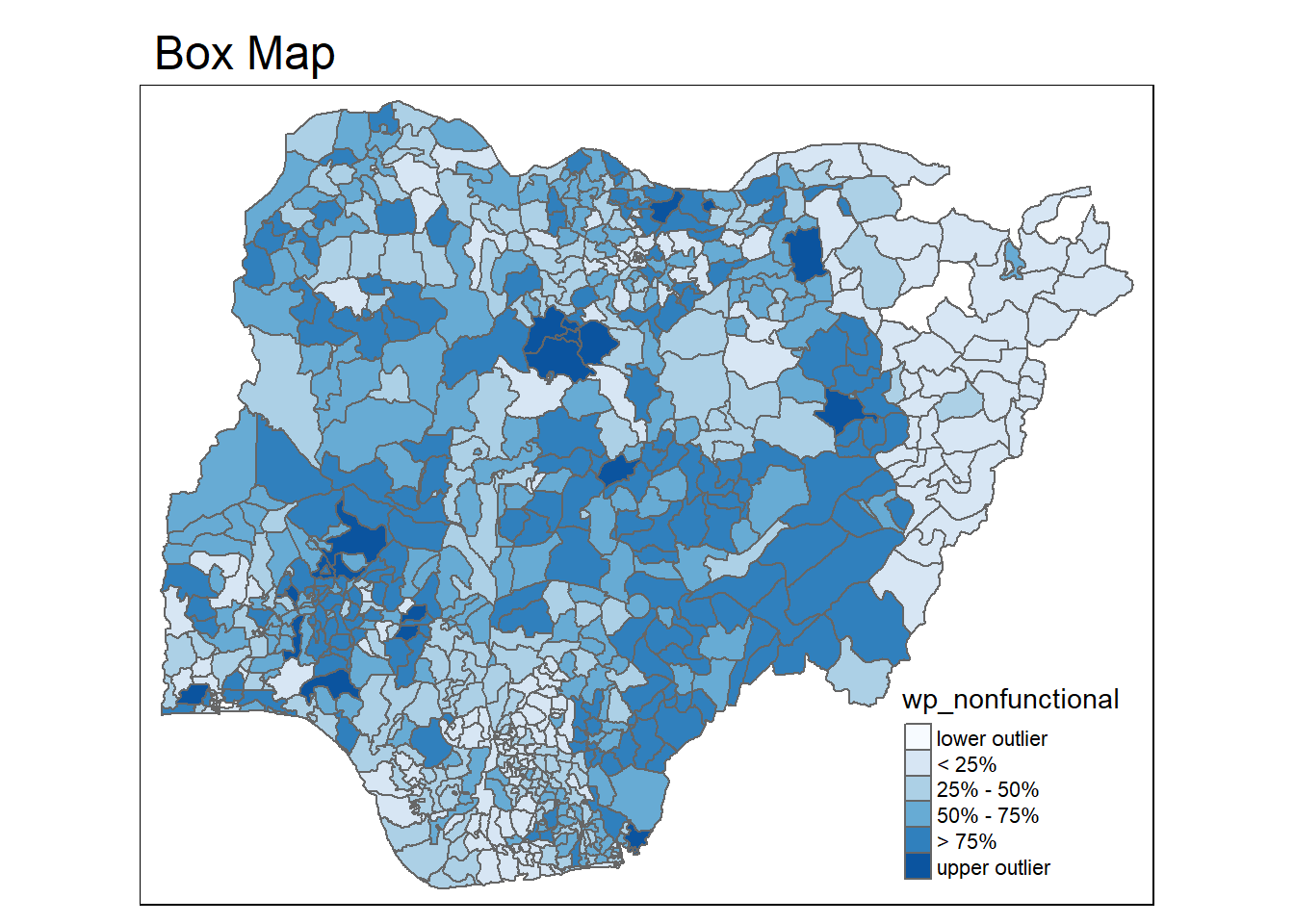
In essence, a box map is an augmented quartile map, with an additional lower and upper category. When there are lower outliers, then the starting point for the breaks is the minimum value, and the second break is the lower fence. In contrast, when there are no lower outliers, then the starting point for the breaks will be the lower fence, and the second break is the minimum value (there will be no observations that fall in the interval between the lower fence and the minimum value).

code block
ggplot(data = NGA_wp,
       aes(x = "",
           y = wp_nonfunctional)) +
  geom_boxplot()
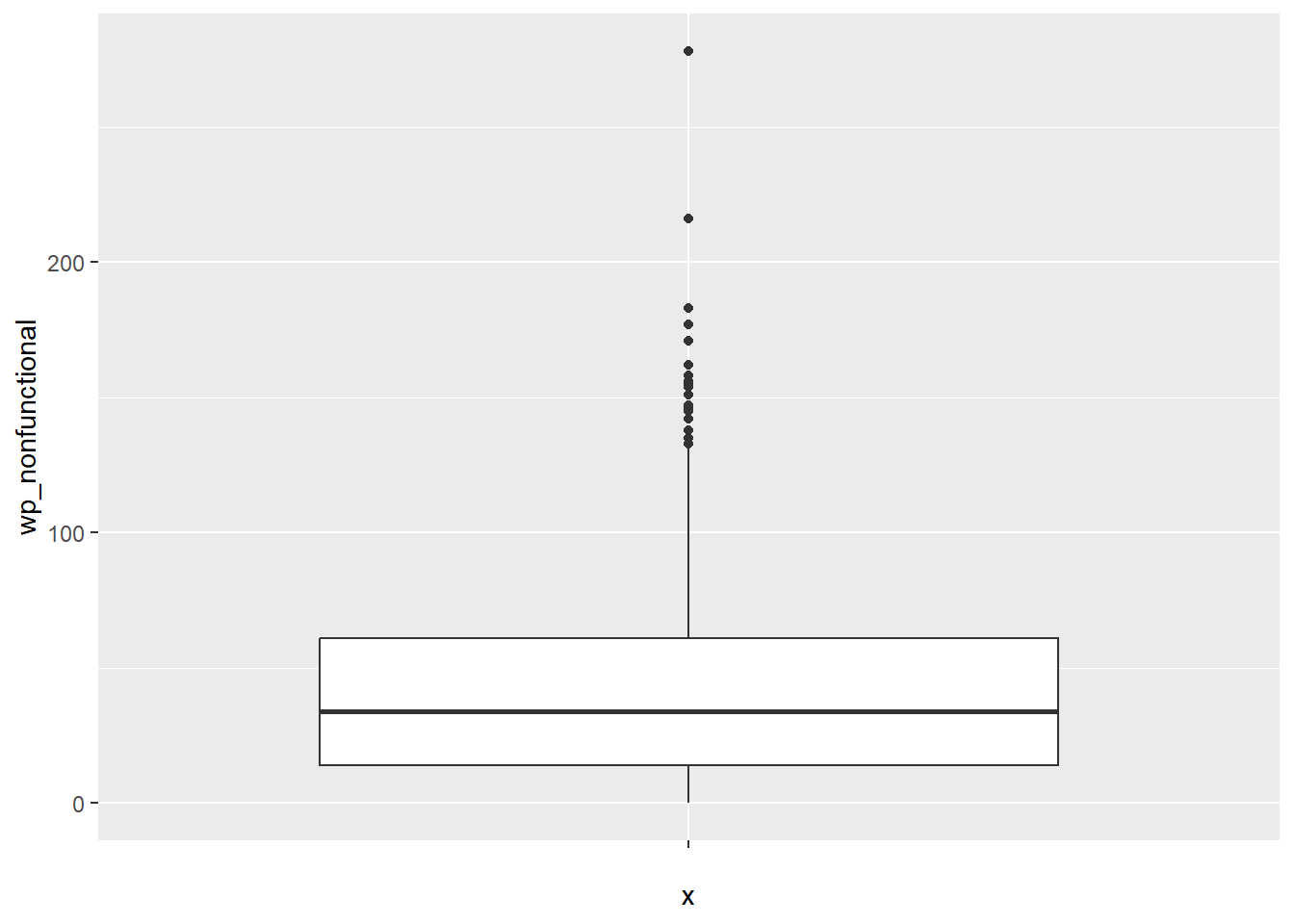
  • Displaying summary statistics on a choropleth map by using the basic principles of boxplot.

  • To create a box map, a custom breaks specification will be used. However, there is a complication. The break points for the box map vary depending on whether lower or upper outliers are present.

3.3.2.1 Creating the boxbreaks function

The code chunk below is an R function that creating break points for a box map.

  • arguments:

    • v: vector with observations

    • mult: multiplier for IQR (default 1.5)

  • returns:

    • bb: vector with 7 break points compute quartile and fences
code block
boxbreaks <- function(v,mult=1.5) {
  qv <- unname(quantile(v))
  iqr <- qv[4] - qv[2]
  upfence <- qv[4] + mult * iqr
  lofence <- qv[2] - mult * iqr
  # initialize break points vector
  bb <- vector(mode="numeric",length=7)
  # logic for lower and upper fences
  if (lofence < qv[1]) {  # no lower outliers
    bb[1] <- lofence
    bb[2] <- floor(qv[1])
  } else {
    bb[2] <- lofence
    bb[1] <- qv[1]
  }
  if (upfence > qv[5]) { # no upper outliers
    bb[7] <- upfence
    bb[6] <- ceiling(qv[5])
  } else {
    bb[6] <- upfence
    bb[7] <- qv[5]
  }
  bb[3:5] <- qv[2:4]
  return(bb)
}

3.3.2.2 Creating the get.var function

The code chunk below is an R function to extract a variable as a vector out of an sf data frame.

  • arguments:

    • vname: variable name (as character, in quotes)

    • df: name of sf data frame

  • returns:

    • v: vector with values (without a column name)
code block
get.var <- function(vname,df) {
  v <- df[vname] %>% st_set_geometry(NULL)
  v <- unname(v[,1])
  return(v)
}

3.3.2.3 Test drive the newly created function

Let’s test the newly created function.

code block
var <- get.var("wp_nonfunctional", NGA_wp) 
boxbreaks(var)
[1] -56.5   0.0  14.0  34.0  61.0 131.5 278.0

3.3.2.4 Boxmap function

The code chunk below is an R function to create a box map.

  • arguments:
-    vnam: variable name (as character, in quotes)

-   df: simple features polygon layer

-   legtitle: legend title

-   mtitle: map title

-   mult: multiplier for IQR

-   returns: - a tmap-element (plots a map)
code block
boxmap <- function(vnam, df, 
                   legtitle=NA,
                   mtitle="Box Map",
                   mult=1.5){
  var <- get.var(vnam,df)
  bb <- boxbreaks(var)
  tm_shape(df) +
    tm_polygons() +
  tm_shape(df) +
     tm_fill(vnam,title=legtitle,
             breaks=bb,
             palette="Blues",
          labels = c("lower outlier", 
                     "< 25%", 
                     "25% - 50%", 
                     "50% - 75%",
                     "> 75%", 
                     "upper outlier"))  +
  tm_borders() +
  tm_layout(main.title = mtitle, 
            title.position = c("left",
                               "top"))
}
code block
tmap_mode("plot")
boxmap("wp_nonfunctional", NGA_wp)
Source Code
---
title: "Hands-on Exercise 8c"
subtitle: "Lesson 8c: [Analytical Mapping](https://r4va.netlify.app/chap23)" 
author: "Victoria Neo"
date: 02/28/2024
date-modified: last-modified
format:
  html:
    code-fold: true
    code-summary: "code block"
    code-tools: true
    code-copy: true
execute:
  eval: true
  echo: true
  freeze: true
  warning: false
  message: false
---

![*Taken from* [SHADE](https://www.shadegroup.org/river-walk-revitalization/2018/6/18/analytical-maps-of-the-river-walk)](images/clipboard-1018069501.png){fig-align="left"}

# 1 Overview

In this in-class exercise, you will gain hands-on experience on using appropriate R methods to plot analytical maps.

## 1.1 **Learning outcomes**

By the end of this in-class exercise, you will be able to use appropriate functions of tmap and tidyverse to perform the following tasks:

-   Importing geospatial data in rds format into R environment.

-   Creating cartographic quality choropleth maps by using appropriate tmap functions.

-   Creating rate map

-   Creating percentile map

-   Creating boxmap

# 2 **Getting Started**

## 2.1 Installing and loading the required libraries

```{r}
pacman::p_load(sf, tmap, tidyverse)
```

## 2.2 Data

For the purpose of this hands-on exercise, a prepared data set called *NGA_wp.rds* will be used. The data set is a polygon feature data.frame providing information on water point of Nigeria at the LGA level. You can find the data set in the *rds* sub-direct of the hands-on *data* folder.

### 2.2.1 **Importing Data**

The code chunk below uses *read_csv()* function of **readr** package to import *SGPools_svy21.csv* into R as a tibble data frame called *sgpools*.

```{r}
NGA_wp <- read_rds("data/rds/NGA_wp.rds")
```

After importing the data file into R, it is important for us to examine if the data file has been imported correctly.

The code chunk below shows list() is used to do the job.

```{r}
list(NGA_wp) 
```

# 3 **Basic Choropleth Mapping**

## 3.1 **Visualising distribution of functional water point**

The code chunks below are used to create an interactive point symbol map.

```{r}
p1 <- tm_shape(NGA_wp)+
  tm_fill("wp_functional",
          n = 10,
          style = "jenks",
          palette = "Blues") +
  tm_borders(lwd = 0.1,
             alpha = 0.5) +
  tm_layout(main.title = "Distribution of functional water point by LGAs",
            legend.outside = FALSE)
```

```{r}
p2 <- tm_shape(NGA_wp)+
  tm_fill("total_wp",
          n = 10,
          style = "jenks",
          palette = "Blues") +
  tm_borders(lwd = 0.1,
             alpha = 0.5) +
  tm_layout(main.title = "Distribution of total water point by LGAs",
            legend.outside = FALSE)
```

```{r}
tmap_arrange(p2, p1, nrow = 1)
```

## 3.2 **Choropleth Map for Rates**

In much of our readings we have now seen the importance to map rates rather than counts of things, and that is for the simple reason that water points are not equally distributed in space. That means that if we do not account for how many water points are somewhere, we end up mapping total water point size rather than our topic of interest.

### 3.2.1 **Deriving Proportion of Functional Water Points and Non-Functional Water Points**

We will tabulate the proportion of functional water points and the proportion of non-functional water points in each LGA. In the following code chunk, `mutate(`) from **dplyr** package is used to derive two fields, namely *pct_functional* and *pct_nonfunctional*.

```{r}
NGA_wp <- NGA_wp %>%
  mutate(pct_functional = wp_functional/total_wp) %>%
  mutate(pct_nonfunctional = wp_nonfunctional/total_wp)
```

### 3.2.2 **Plotting map of rate**

Plot a choropleth map showing the distribution of percentage functional water point by LGA.

```{r}
tm_shape(NGA_wp)+
  tm_fill("pct_functional",
          n = 10,
          style = "jenks",
          palette = "Blues",
          legend.hist = TRUE) +
  tm_borders(lwd = 0.1,
             alpha = 0.5) +
  tm_layout(main.title = "Rate map of functional water point by LGAs",
            legend.outside = TRUE)
```

## 3.3 **Extreme Value Maps**

Extreme value maps are variations of common choropleth maps where the classification is designed to highlight extreme values at the lower and upper end of the scale, with the goal of identifying outliers. These maps were developed in the spirit of spatializing EDA, i.e., adding spatial features to commonly used approaches in non-spatial EDA (Anselin 1994).

### 3.3.1 **Percentile Map**

The percentile map is a special type of quantile map with six specific categories: 0-1%,1-10%, 10-50%,50-90%,90-99%, and 99-100%. The corresponding breakpoints can be derived by means of the base R quantile command, passing an explicit vector of cumulative probabilities as c(0,.01,.1,.5,.9,.99,1). Note that the begin and endpoint need to be included.

#### 3.3.1.1 Data Preparation

Step 1: Exclude records with NA by using the code chunk below.

```{r}
NGA_wp <- NGA_wp %>%
  drop_na()
```

Step 2: Creating customised classification and extracting values

```{r}
percent <- c(0,.01,.1,.5,.9,.99,1)
var <- NGA_wp["pct_functional"] %>%
  st_set_geometry(NULL)
quantile(var[,1], percent)
```

::: {.kambox .kam data-latex="kam"}
#### What did Prof Kam say?

When variables are extracted from an sf data.frame, the geometry is extracted as well. For mapping and spatial manipulation, this is the expected behavior, but many base R functions cannot deal with the geometry. Specifically, the `quantile()` gives an error. As a result `st_set_geomtry(NULL)` is used to drop geomtry field.
:::

#### 3.3.1.2 Why write functions?

> Writing a function has three big advantages over using copy-and-paste:
>
> -   You can give a function an evocative name that makes your code easier to understand.
>
> -   As requirements change, you only need to update code in one place, instead of many.
>
> -   You eliminate the chance of making incidental mistakes when you copy and paste (i.e. updating a variable name in one place, but not in another).
>
> Source: [Chapter 19: Functions](https://r4ds.had.co.nz/functions.html#functions) of **R for Data Science**.

#### 3.3.1.3 Creating the get.var function

Firstly, we will write an R function as shown below to extract a variable (i.e. *wp_nonfunctional*) as a vector out of an sf data.frame.

-   arguments:

    -   vname: variable name (as character, in quotes)

    -   df: name of sf data frame

-   returns:

    -   v: vector with values (without a column name)

```{r}
get.var <- function(vname,df) {
  v <- df[vname] %>% 
    st_set_geometry(NULL)
  v <- unname(v[,1])
  return(v)
}
```

#### 3.3.1.4 A percentile mapping function

Next, we will write a percentile mapping function by using the code chunk below.

```{r}
percentmap <- function(vnam, df, legtitle=NA, mtitle="Percentile Map"){
  percent <- c(0,.01,.1,.5,.9,.99,1)
  var <- get.var(vnam, df)
  bperc <- quantile(var, percent)
  tm_shape(df) +
  tm_polygons() +
  tm_shape(df) +
     tm_fill(vnam,
             title=legtitle,
             breaks=bperc,
             palette="Blues",
          labels=c("< 1%", "1% - 10%", "10% - 50%", "50% - 90%", "90% - 99%", "> 99%"))  +
  tm_borders() +
  tm_layout(main.title = mtitle, 
            title.position = c("right","bottom"))
}
```

#### 3.3.1.5 Test drive the percentile mapping function

To run the function, type the code chunk as shown below.

```{r}
percentmap("total_wp", NGA_wp)
```

Note that this is just a bare bones implementation. Additional arguments such as the title, legend positioning just to name a few of them, could be passed to customise various features of the map.

### 3.3.2 **Box map**

In essence, a box map is an augmented quartile map, with an additional lower and upper category. When there are lower outliers, then the starting point for the breaks is the minimum value, and the second break is the lower fence. In contrast, when there are no lower outliers, then the starting point for the breaks will be the lower fence, and the second break is the minimum value (there will be no observations that fall in the interval between the lower fence and the minimum value).

```{r}
ggplot(data = NGA_wp,
       aes(x = "",
           y = wp_nonfunctional)) +
  geom_boxplot()
```

-   Displaying summary statistics on a choropleth map by using the basic principles of boxplot.

-   To create a box map, a custom breaks specification will be used. However, there is a complication. The break points for the box map vary depending on whether lower or upper outliers are present.

#### 3.3.2.1 Creating the boxbreaks function

The code chunk below is an R function that creating break points for a box map.

-   arguments:

    -   v: vector with observations

    -   mult: multiplier for IQR (default 1.5)

-   returns:

    -   bb: vector with 7 break points compute quartile and fences

```{r}
boxbreaks <- function(v,mult=1.5) {
  qv <- unname(quantile(v))
  iqr <- qv[4] - qv[2]
  upfence <- qv[4] + mult * iqr
  lofence <- qv[2] - mult * iqr
  # initialize break points vector
  bb <- vector(mode="numeric",length=7)
  # logic for lower and upper fences
  if (lofence < qv[1]) {  # no lower outliers
    bb[1] <- lofence
    bb[2] <- floor(qv[1])
  } else {
    bb[2] <- lofence
    bb[1] <- qv[1]
  }
  if (upfence > qv[5]) { # no upper outliers
    bb[7] <- upfence
    bb[6] <- ceiling(qv[5])
  } else {
    bb[6] <- upfence
    bb[7] <- qv[5]
  }
  bb[3:5] <- qv[2:4]
  return(bb)
}
```

#### 3.3.2.2 Creating the get.var function

The code chunk below is an R function to extract a variable as a vector out of an sf data frame.

-   arguments:

    -   vname: variable name (as character, in quotes)

    -   df: name of sf data frame

-   returns:

    -   v: vector with values (without a column name)

```{r}
get.var <- function(vname,df) {
  v <- df[vname] %>% st_set_geometry(NULL)
  v <- unname(v[,1])
  return(v)
}
```

#### 3.3.2.3 Test drive the newly created function

Let’s test the newly created function.

```{r}
var <- get.var("wp_nonfunctional", NGA_wp) 
boxbreaks(var)
```

#### 3.3.2.4 Boxmap function

The code chunk below is an R function to create a box map.

-   arguments:

```         
-    vnam: variable name (as character, in quotes)

-   df: simple features polygon layer

-   legtitle: legend title

-   mtitle: map title

-   mult: multiplier for IQR

-   returns: - a tmap-element (plots a map)
```

```{r}
boxmap <- function(vnam, df, 
                   legtitle=NA,
                   mtitle="Box Map",
                   mult=1.5){
  var <- get.var(vnam,df)
  bb <- boxbreaks(var)
  tm_shape(df) +
    tm_polygons() +
  tm_shape(df) +
     tm_fill(vnam,title=legtitle,
             breaks=bb,
             palette="Blues",
          labels = c("lower outlier", 
                     "< 25%", 
                     "25% - 50%", 
                     "50% - 75%",
                     "> 75%", 
                     "upper outlier"))  +
  tm_borders() +
  tm_layout(main.title = mtitle, 
            title.position = c("left",
                               "top"))
}
```

```{r}
tmap_mode("plot")
boxmap("wp_nonfunctional", NGA_wp)
```